
eRacks Systems Tech Blog
Open Source Experts Since 1999
A Sad Day – the Demise of Persona / BrowserID
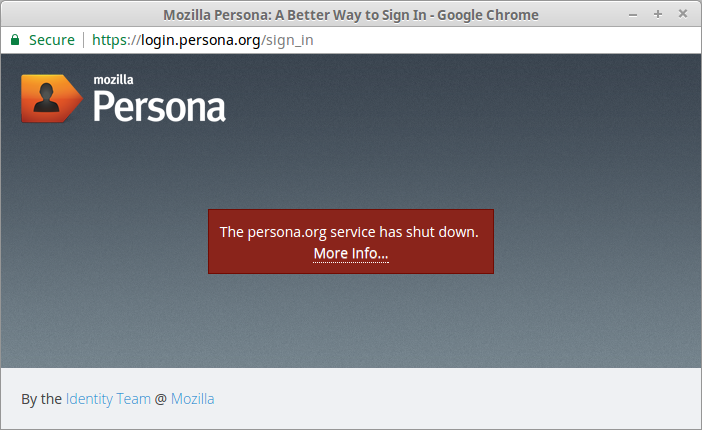
A Sad Day – Mozille BrowserID / Persona Dies
It’s a sad day – the best of the federated Authentication Providers, without its own agenda or privacy issues, has shut down, due to the public’s apparent lack of interest and / or awareness.
Mozilla Persona, which started life several years ago as BrowserID, was the only one of the OpenAuth-based Authentication providers that didn’t insist on being logged in to a commercial site in order to be authenticated by proxy at the time – with all the privacy issues that entails.
Although it’s no secret that The Public is notorious for not caring about (or not even being aware of) privacy (or at least sacrificing it in favor of convenience), it’s unfortunate that the Mozilla Foundation has chosen not to spend the time, effort, and money to educate the public, as it has chosen to do with its other products.
Here are some relevant excerpts from the shutdown page:
FAQs
A website I use requires Persona for login, what should I do?
You will need to contact the site owner and ask about their plans for migrating away from Persona.
Mozilla staff can find more information about the progress of migrating internal sites on this mana page.
Why is persona.org being shut down?
Our metrics show that usage of persona.org is low, and has not grown over the last two years.
Hosting using vps hosting plans at the level of security and availability required for an authentication system is no small undertaking, and Mozilla can no longer justify dedicating limited resources to this project. We will do everything we can to shut it down in a graceful and responsible manner.
What will happen in the meantime?
Between now and November 30th, 2016, Mozilla will continue to support the Persona service at a maintenance level: Security issues will be resolved in a timely manner and the services will be kept online, but we do not expect to develop or deploy any new features. Support will continue to be available on the dev-identity mailing list and in the #services-dev IRC channel.
All websites that rely on Persona will need to migrate to another means of authentication during this time.
What happens after that?
On or after November 30th, 2016, the services hosted by Mozilla on persona.org will be taken offline. This includes the persona.org website, the javascript shim, the fallback IdP and identity bridges, and the hosted verifier.
Mozilla will retain control of the persona.org domain and will not transfer it to a third party. This is a security measure to protect websites that have not completed their migration away from the service.
All user data stored on the persona.org services will be destroyed, including registered email addresses and password hashes. Since the privacy of user data is of utmost importance to Mozilla, we will not transfer it to any third parties.
What about the code?
All of Persona’s code — core, bridges, shims, and more — is open source and remains available on github. Though this marks the end of Mozilla’s direct involvement in Persona, we encourage others to continue learning from and building upon our work.
Migration Suggestions and Guidelines
The following alternative login options are available for sites migrating away from Persona. We will continue to update this page throughout the year.
We intentionally designed Persona to expose email addresses rather than opaque identifiers, which should ease the transition to other systems that provide verified email addresses.
Mozilla-hosted sites may find additional, staff-login-specific migration options on the internal mana page.
Delegated Authentication Providers
Many large email and service providers offer delegated login for third-party applications, including Google, Facebook and GitHub. Indeed, we have found that many sites currently using Persona also offer login via one or more of these services. While these services do not offer equivalently-strong privacy guarantees to Persona, they are a convenient and secure choice for users since they avoid the creation of a site-specific password.
We plan to offer delegated authentication with Firefox Accounts some time in 2016. If you’re interested in adding Firefox Accounts as a login option to your site, please reach out to us on the dev-fxacct mailing list.
Site-Specific Accounts
Many web frameworks offer password-based user accounts functionality out-of-the-box. Although it requires users to create and remember yet another password, it can be a good choice for users who do not have (or do not wish to share) an account with a delegated authentication provider.
For existing users who previously authenticated with Persona, you could consider authenticating them through Persona again to confirm their email address, then prompting them to create a site-specific password.
Passwordless Email Login
As an alternative to setting a site-specific password, you can allow users to login directly via email link, as described in this article and implemented by libraries like passwordless. This can avoid the security implications of users having to create and manage another password, and may be a good fallback option when used in combination with delegated authentication providers.
Self-hosting Persona
Since the code for Persona is open-source, it would be possible for reliers to self-host an instance of the service that is dedicated to their own use.
This approach is not recommended most reliers. Persona has a large and complex codebase that has not seen significant development in several years, and Mozilla will not provide security or maintenance updates after 30th November 2016.
More?
We encourage affected reliers to document any alternative solutions here and to discuss them on the dev-identity mailing list, so that others can benefit from their experience.
- The Portier open source project attempts to replicate much of Persona’s user experience, while being easy to self-host, even on the free tier of PaaS providers like Heroku. Similar to Persona, Portier supports identity-bridging to Gmail. It falls back to passwordless-style login links for everyone else.
Taken from:
https://wiki.mozilla.org/Identity/Persona_Shutdown_Guidelines_for_Reliers
We at eRacks wil be looking into Portier for our own usage, as well.
j
joe January 9th, 2017
Posted In: authentication, News, Open Source
Tags: Firefox, Mozilla, Privacy, Software Freedom
8TB Western Digital Red and RedPro now available

 8TB WD Red and RedPro drives are now available in the dropdowns on all eRacks NAS Systems, and are available on select other eRacks systems, and of course all eRacks systems by custom quote –
If you don’t see it on the system you want, just ask & we’ll quote you!
j
joe December 3rd, 2016
Posted In: Backups, NAS24, NAS36, NAS50, NAS72, servers
TrueOS Now Available
 The former PC-BSD Desktop offering from ixSystems has now morphed into TrueOS Desktop –
It’s a rolling-release BSD Distro based on FreeBSD-CURRENT with many improvements, changes, and enhancements including security, LibreSSL, drivers, and more – Read about it, here: https://www.trueos.org/
We’re currently doing an eRacks/HUMBOLDT for a customer with it – Exciting!
j
joe November 1st, 2016
Posted In: Development, FreeBSD, New products, Operating Systems
Tags: BSD, freebsd, HUMBOLDT, LibreSSL, Rolling Release, TrueOS
Building Your Online Presence
Because of digitalization, having a website is essential for individuals and businesses alike. It serves as your online identity and can significantly impact your visibility on search engines. Here’s a step-by-step guide to creating a website and ensuring it appears on search engines.
Having a website is crucial for a kids clothing website that sells modest girls dresses as it provides a platform to showcase and sell products to a global audience. A website allows customers to conveniently browse through the collection, learn about the brand, and make purchases from the comfort of their own homes. It also enables the business to establish an online presence, build trust, and reach a larger customer base, ultimately driving sales and growth.
Step 1: Choose Your Website Platform
Selecting the right platform is crucial. Popular options include WordPress, Wix, Squarespace, and Shopify (for e-commerce). Consider your website’s purpose and your technical proficiency when making this choice.
Step 2: Domain Name and Hosting
Choose a domain name that reflects your brand or content. Purchase domain hosting from a reliable provider. Many website builders offer domain registration as part of their services.
Step 3: Design Your Website
Design your website with your target audience in mind. Use clean and user-friendly layouts, readable fonts, and high-quality images. Ensure that your website is mobile-responsive to cater to smartphone users. You can visit sites like https://www.cleardigital.com/locations/web-design-houston/ and hire experts to do your site’s design.
Step 4: Create Quality Content
Content is king when it comes to search engine visibility. Regularly publish relevant, informative, and engaging content. Use proper headings (H1, H2, etc.), incorporate keywords naturally, and include internal and external links.
Step 5: Optimize for SEO
Search Engine Optimization (SEO) is essential for search engine visibility. Optimize your website by:
- Using relevant keywords in titles, headings, and content.
- Creating unique meta titles and descriptions for each page.
- Optimizing images with descriptive alt text.
- Ensuring fast loading times.
- Setting up an XML sitemap for search engines.
Hire SEO services to assist in targeting the right keywords.
Step 6: Mobile Optimization
Google prioritizes mobile-friendly websites in its search results. Ensure that your website looks and functions well on mobile devices to avoid a drop in rankings.
Step 7: Submit Your Website to Search Engines
Submit your website to search engines like Google, Bing, and Yahoo. Google Search Console and Bing Webmaster Tools offer valuable insights into your website’s performance.
Step 8: Build Backlinks
Backlinks from reputable websites can boost your search engine rankings. Create high-quality content that others will want to link to, and engage in ethical link-building practices.
Step 9: Monitor and Update
Regularly monitor your website’s performance using analytics tools like Google Analytics. Track your rankings, traffic, and user behavior. Update your content and website structure as needed to stay competitive.
Step 10: Be Patient
SEO is a long-term strategy. It may take several months to see significant improvements in your search engine rankings. Continue to provide valuable content and engage with your audience.
By following these steps and consistently working on your website’s content and optimization, you can create a strong online presence and improve your website’s visibility on search engines. Remember that SEO is an ongoing process, and staying up-to-date with best practices is key to long-term success.
joe October 30th, 2016
Posted In: How-To