
eRacks Systems Tech Blog
Open Source Experts Since 1999
eRacks/GAMER: A Linux Gaming PC That Boots Straight Into Steam
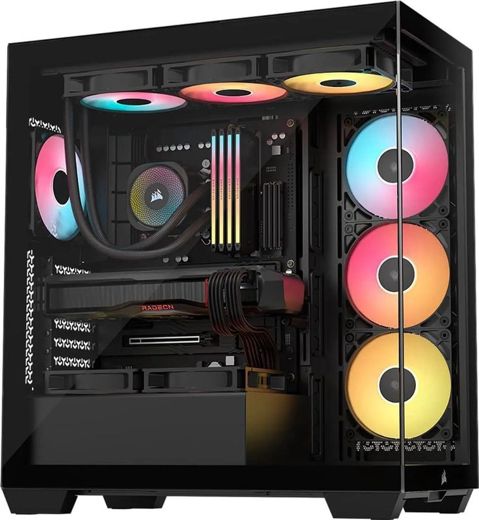
We have built Linux machines since 1999, and for most of that time gaming was the one thing people told us Linux couldn’t do. That changed. Valve’s Proton (a compatibility layer built into Steam that runs Windows games on Linux) and the Steam Deck turned Linux into a real gaming platform. So we built a proper desktop gaming model, with all the bells and whistles: eRacks/GAMER.
What it is
eRacks/GAMER is a tower built to order, starting at $4,395 with an AMD Ryzen 7 9700X, an AMD Radeon RX 9070 XT with 16GB, 32GB of DDR5-6000 RGB memory and a 2TB WD Black NVMe drive (fast solid-state storage). It sits in a panoramic tempered-glass case, black or white, with three ARGB (addressable RGB) fans and a 360mm ARGB liquid cooler, on an AM5 X870 motherboard with Wi-Fi 7 and 2.5Gb Ethernet, powered by an 850W ATX 3.1 supply.
From there the configurator goes where you want it: Ryzen X3D processors up to the 16-core Ryzen 9 9950X3D2 (X3D chips carry AMD 3D V-Cache, extra on-chip cache that AMD aims at games), GeForce RTX 5070, 5070 Ti and 5080 cards, 64GB of memory, 4TB of storage, and the lighting set the way you like it: a synced rainbow, one color, or off.
It boots into Steam
GAMER ships with Bazzite, a Fedora-based gaming system that boots into Steam Gaming Mode, the full-screen, controller-friendly interface from the Steam Deck. Steam comes installed with Proton, along with Heroic for Epic and GOG libraries, Lutris, GameMode and MangoHud (an on-screen frame-rate and temperature overlay). Sign in with your own Steam account and your library is there.
Prefer something else? Ubuntu with Steam is in the menu, and so are Fedora, Nobara, CachyOS, Pop!_OS and Mint. Every one gets the same gaming stack, installed and tested before it ships.
Why not SteamOS?
We asked ourselves the same thing. SteamOS is Valve’s own, and Valve supports it on its own hardware plus one Lenovo handheld: its FAQ lists the Steam Deck, Steam Machine, Steam Frame and Lenovo Legion Go S as the only devices “Powered by SteamOS”. On desktop PCs, AMD graphics are in beta and NVIDIA isn’t supported, and Valve’s own SteamOS page says not to treat it as a replacement for a desktop operating system. Bazzite gives you a Steam Gaming Mode like SteamOS’s, plus NVIDIA drivers and a full desktop. If you want SteamOS anyway, it is an option on Radeon builds.
The games that lock Linux out
Proton runs Windows games on Linux. The exception is a handful of online games whose publishers have decided Linux players aren’t welcome: their anti-cheat software refuses to run on Linux, and you’re shut out for no reason except your choice of operating system. The community list at areweanticheatyet.com tracks them. As of today it shows Valorant and Fortnite as denied, and recent Call of Duty titles as broken.
We think that’s the wrong call. We’d rather send our customers to the studios that support Linux players, and there are plenty of great games that welcome you. We also understand that some games are compelling enough that people play them anyway, whatever their publisher’s appetite for control. If that’s you, it’s your machine: tell us what you want, Windows dual boot included, and we’ll build it that way.
On the couch, on the TV
Plug GAMER into the living-room TV and Steam’s Big Picture mode turns it into a console. Or leave it at your desk and stream to the TV with Steam Remote Play: Valve’s Steam Link app runs on Apple TV, Android TV and Amazon Fire TV. Add up to four Xbox, DualSense or 8BitDo controllers in the configurator, or Valve’s new Steam Controller by quote (Valve sells it through a reservation queue).
Streaming your games instead? Add a 4K capture card, a USB microphone, and Discord and OBS Studio preinstalled.
A word on prices
Graphics cards cost more than they did a year ago. On October 5, 2025 we priced the GeForce RTX 5070 Ti at $799 at Newegg; this morning the lowest new, in-stock 5070 Ti there was $1,169.99. The Radeon RX 9070 XT went from $799 in April to $879.99 today. That is one reason the RX 9070 XT is our default: it is the better match for Linux and SteamOS, and today it costs about $290 less than the 5070 Ti. The 5070 Ti is one click away if you want it.
For the longer version, with sources, see our Linux gaming PC guide. Ready to build one? Configure eRacks/GAMER, or write to us at info@eracks.com.
joe October 16th, 2026
Posted In: News, Technology
Tags: Bazzite, eRacks/GAMER, gaming PC, Linux gaming, Proton, Steam, SteamOS
How We Came to KVM: Tucson 2007, Napa 2008, and Why We Built eVirt

In our last post on virtualization I promised the story of how we came to KVM, the Kernel-based Virtual Machine. Here it is. It starts in a resort outside Tucson in August 2007, at the first KVM Forum, and it ends with the small piece of software our own servers still run on.
Tucson, August 2007
The first KVM Forum ran from August 29 to 31, 2007, at the Loews Ventana Canyon in Tucson. KVM had been in the mainline Linux kernel for about six months by then: it arrived in version 2.6.20 in February, as a driver for the hardware virtualization features in Intel and AMD processors. Avi Kivity, who started it at a small company called Qumranet, opened the forum with a talk titled “KVM, One Year On”.
I went expecting to learn more about the Linux kernel and about virtualization. What I found was a technology that was going to change where virtualization went. The default answer in 2007 was Xen, a separate hypervisor that ran underneath Linux. By my count at the time it was roughly ten times the code, and its host side lived outside the kernel. KVM took the opposite approach: Linux itself becomes the hypervisor. The scheduler, the memory manager and the device drivers are the ones the kernel already has, so every improvement to Linux is an improvement to the hypervisor for free. Sitting in that room, it was obvious to me that this would replace the virtualization engines of the day. It largely has.
Two moments that stuck
The first was meeting Avi Kivity and having drinks with the whole Qumranet crew, including Benny Schnaider, the CEO, who closed the forum with the final keynote. I was so impressed with Avi: his intuitive grasp of everything he was doing, and the mental bandwidth he had for all of it at once.
The second was in a session with Rusty Russell, the kernel developer who wrote ipchains and then iptables, the Linux packet filter behind countless firewalls. His talk in Tucson was about lguest, his deliberately minimal hypervisor, but the remark I remember was about iptables. He said, more or less, that iptables was never intended as an end-user product. It was a toolkit for building one. That changed how I looked at the whole stack. The kernel gives you good tools. The product layer on top should be small, opinionated and yours, and it should not try to re-wrap every tool underneath it.
Napa, June 2008
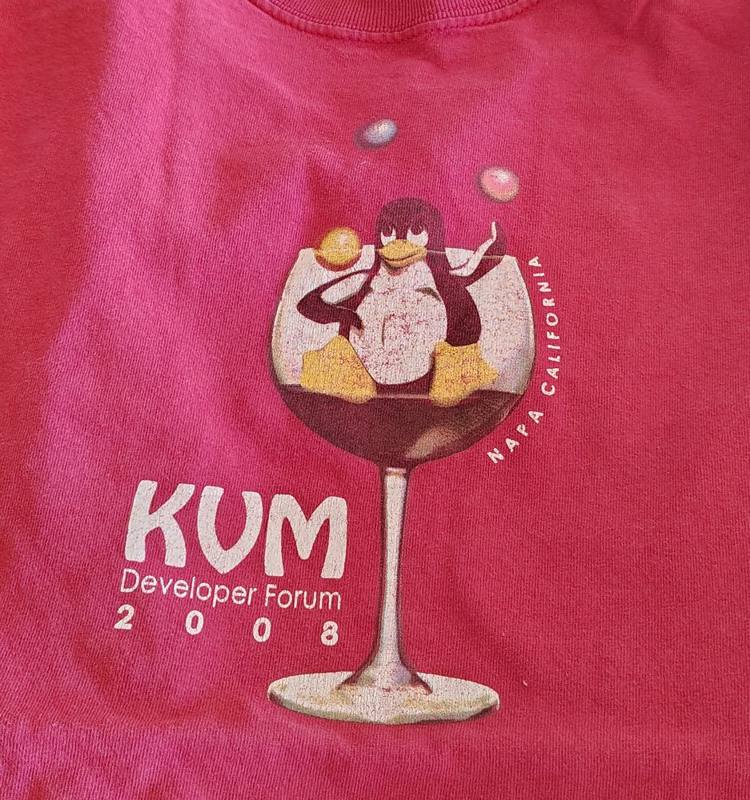
The second forum moved to the Napa Valley, June 11 to 13, 2008, and the agenda showed how fast things were moving: Mac OS X running in KVM, memory sharing between virtual machines, passing physical devices straight through to a guest. Three months later, in September 2008, Red Hat bought Qumranet for $107 million. KVM was no longer an interesting experiment. It was the future of Linux virtualization, and by then we were already running it.
What libvirt got wrong
The obvious way to manage KVM then, and still the way most guides assume, was libvirt. It did not work for us. In 2008 it was full of stubs and unimplemented features, and it rewrote the surface area for getting anything done, so that using it was more work than going directly to the QEMU commands underneath. QEMU is the machine emulator that KVM accelerates; it already had a perfectly good command line and monitor.
Then there was the XML. Every machine became an XML document, and XML as a configuration format is a disaster of invalid states: documents that parse but do not mean anything, settings that conflict, and no good way to see what the machine will actually do until you run it. The industry has largely moved on to simpler configuration languages since. To be fair, libvirt has picked up a few redeeming features over the years. In my view it is still not worth it, which is Rusty’s point exactly: a tool that tries to be the product ends up harder to use than the toolkit it wraps.
The first eVirt
So we built the opposite. The first eVirt did one thing: it launched virtual machines from a simple configuration file with well chosen defaults, talking to QEMU directly. It took a tiny fraction of the code of anything built on libvirt, and we have used it in production ever since. The current version, the fourth, keeps the same idea: a short YAML file per machine (CPU, memory, disks, bridge, fixed address), an Ubuntu cloud image seeded with cloud-init, and one command to build or rebuild it. Our own web, mail and lab servers are defined that way, and I described it in more detail in the last post.
What it taught us
Nearly two decades later, the lessons from those two forums are still how we build. Put the hard parts in the kernel, where they get the most eyes and the longest support. Keep the layer on top thin enough that you can read it, replace it, or skip it. And treat the management tools as a choice, not a commitment: a virtual machine disk is a file, and a good host lets you change your mind.
That is why our default virtualization host is still Ubuntu Server with KVM, and why we install whatever management layer a customer asks for: libvirt with Cockpit or virt-manager, Proxmox, Incus, IncusOS or XCP-ng. If you would rather run what we run, we install eVirt on a consulting basis.
Planning a virtualization build, or moving off a platform that has started sending license invoices? Write to us at info@eracks.com, or start with a quote request.
joe October 8th, 2026
Posted In: News, servers, Technology
Tags: eVirt, KVM, KVM Forum, libvirt, Linux kernel, QEMU, virtualization
The Apps Were Never the Box: Why We Build Open NAS Systems

An XDA Developers writer published a piece last week that we could have written ourselves. He kept his Synology NAS (network-attached storage: a box of drives on your network that serves files and apps) and walked away from almost every app Synology ships with it. His photos moved to Immich, his music to Navidrome, his movies to Plex and Jellyfin, his documents to Paperless. All of them run in Docker, a way to package an app with everything it needs so it runs the same on any Linux machine.
His reasons are specific. Synology Photos, in his words, is “pretty dated”: no major new features in a while, and missing the GPS tagging, import workflows and shared libraries Immich has, with a mobile backup he found less reliable. Synology’s music app is “not very good at all”. And Synology discontinued its own video streaming app, which leaves a basic DLNA server as the only first-party option.
We have been saying this for years. It is worth saying why.
A NAS is two things
Every NAS is storage plus the apps that use it. Appliance vendors sell the two as one product, and for a while that was a fair trade: the apps were the reason to buy the box. Docker ended that. The open-source apps now move faster than the vendors’ own, which is the writer’s first reason, and because they are containers, they do not care which hardware they run on.
The XDA writer makes the point himself. His apps are “as independent as possible”, so if he moves from Synology to another brand, or to his own server, Immich comes with him. A proprietary app cannot make that promise, and neither can a vendor that decides which of its own apps survive the next release.
Once the apps are open, the box is just storage. And storage should be open too.
What open storage looks like
This is how we build NAS systems, and have for a long time:
- ZFS by default. ZFS is an open-source file system that checksums every block, so it detects and repairs silent corruption instead of serving it back to you. Our NAS line defaults to RAIDZ2, dual parity: any two drives can fail without losing data.
- The drives talk to ZFS directly. We offer an HBA (host bus adapter, the card the drives plug into) in IT mode, which passes each drive straight through instead of hiding it behind a hardware RAID controller. ZFS sees the real disks and their health.
- Standard NAS drives. Our current default is the 24TB Seagate IronWolf Pro, a CMR drive (conventional magnetic recording, the kind that behaves well in a rebuild), bought in the channel like any other part. If a drive fails in year four, you buy another one anywhere.
- Your choice of operating system. Ubuntu LTS by default, or Debian, TrueNAS Community Edition, OpenMediaVault and others. The data outlives the choice: a ZFS pool exported from one machine imports on another running a current OpenZFS.
- Sizes that fit the job. From NAS4, a 1U four-bay unit, to NAS100, 102 bays in 4U, plus the QUIET3 for a home or an office where a rackmount fan would be too loud.
The same apps, without the vendor in the middle
Immich, Jellyfin, Plex, Navidrome and Paperless run on any of these systems exactly as they run on the XDA writer’s Synology. The difference is what sits underneath: an operating system you can update on your schedule, a file system you can move, and hardware with no vendor deciding which parts or apps you may use. Name the apps you want and we install and test them before the system ships, the same way we set up TrueNAS with Jellyfin on a quiet media server this month.
To be fair to Synology: if you want an appliance you never think about, and you are happy with its apps, it is a reasonable buy. The writer still uses his as the backbone of his setup. But if you are already running your own apps, as he is, part of what the appliance price pays for is software you have stopped using.
Where to start
The full NAS line is configurable online, and our July post covers how we re-verified every default drive and part against this year’s shortages. The XDA article is here.
Tell us what you store and which apps you run, and we will size it. Write to info@eracks.com, or start with a quote request.
joe September 24th, 2026
Tags: Docker, Immich, Jellyfin, NAS, Navidrome, Open Source, self-hosting, Synology, TrueNAS, ZFS
The Hypervisor We Left Out: KVM on Ubuntu, Since 2007
Last week we posted about IncusOS, the new immutable operating system built around Incus, and we named the hypervisors people compare it with: Proxmox, XCP-ng, ESXi. A reader could come away thinking those four are the menu. We left out the one we have recommended, installed and run ourselves since 2007. That is KVM, the Kernel-based Virtual Machine, on Ubuntu. This post is the correction, and the reasons.
KVM is the kernel, not a product
A hypervisor is the layer that lets one physical machine run several virtual machines (VMs), each with its own operating system. KVM is unusual among hypervisors because it is not a separate operating system you install under Linux. It is part of Linux. It arrived in kernel 2.6.20, released on 5 February 2007, as a driver for the hardware virtualization extensions in Intel and AMD processors, and it has shipped in every mainline kernel since. Ubuntu, Debian, Red Hat, SUSE and the rest carry it; QEMU provides the machine emulation around it. libvirt, with virsh and virt-manager, is the management layer most guides assume on top of that pair, and we will come back to it.
That placement matters more than any feature list. The virtualization code gets the same scrutiny, the same security updates and the same hardware enablement as the kernel it lives in. When a new processor generation lands, KVM support tends to land with it, in the same release. There is no second vendor to wait on and no second support contract.
The products you compare are mostly KVM underneath
This is the part the comparison lists hide. Proxmox VE runs its virtual machines on KVM and QEMU; its containers use LXC. Incus, the runtime that IncusOS exists to run, uses QEMU and KVM for its virtual machines as well. When people weigh Proxmox against IncusOS, they are choosing a management layer, an update model and a community. The hypervisor doing the work is the same kernel module in both cases. ESXi is the exception on that list: it brings its own kernel, and since the licensing changes of the last two years it is also the one people are most often asking us how to leave.
So the honest version of “which hypervisor” for most of our customers is “which management layer on top of KVM”. Proxmox gives you a web console, clustering and a large community. IncusOS gives you an appliance: an immutable image with A/B partitions for atomic updates and rollback, UEFI Secure Boot and TPM 2.0 measurements, disk encryption backed by the TPM, a stable channel that updates at least weekly and a testing channel that updates daily, and a Migration Manager for moving machines off VMware. Plain Ubuntu Server with KVM, libvirt and cockpit gives you the least opinionated option of the three: a general purpose Linux you already know how to administer, that also happens to be an excellent hypervisor host.
Why we default to Ubuntu plus KVM
We build custom Linux rackmount servers, and most of them leave here as virtualization hosts of one kind or another. Our default recommendation has been Ubuntu with KVM for a long time, for reasons that have not changed much:
- One system to know. The host is a normal Ubuntu Server. Storage (ZFS or LVM, your choice), networking (a bridge, or Open vSwitch when you need it), backups, monitoring and updates are the same tools you use everywhere else. Nothing about the hypervisor is a separate skill.
- Long term support with dates on it. Ubuntu LTS releases carry five years of standard support, ten with Ubuntu Pro. A virtualization host is exactly the kind of machine you want to leave alone for years.
- Hardware enablement on the kernel’s schedule. New CPUs, new NICs, new NVMe controllers: KVM support arrives with the kernel, and Ubuntu’s hardware enablement kernels bring it to the LTS release you are already on.
- No lock in and no license event. Everything in the stack is open source. There is no per socket fee, no feature tier and no vendor that can change the terms under you. The last two years of virtualization news have been a long argument for that point.
- The management layer is your choice, and it can change later. Cockpit or virt-manager if you like a console, Proxmox or Incus if you want a platform, or nothing but QEMU and a few scripts, which is what we run ourselves. The VM disk images are standard qcow2 or raw files. We have moved machines between all of these without reinstalling a guest.
A note on libvirt
Most KVM guides assume libvirt, so we should say where we stand. We have never liked it. It puts an XML document between you and every machine, and the XML sit-ups1 that come with that obscure and complicate what QEMU is actually doing underneath. We prefer to talk to QEMU directly, through its monitor and console, and our own tooling does exactly that. virsh, libvirt’s command line, became somewhat useful years later, but it still drags libvirt’s baggage behind it, and by the time it did we had long since built what we needed. If you want libvirt on a machine we build, you get it, installed and tested. We will just not pretend to love it.
eVirt: what we run our own machines on
Because we have been doing this since the year KVM landed in the kernel, we ended up with our own small framework for it. We call it eVirt, and the current version is the fourth. It is how our own production web servers, mail servers and lab machines are defined and launched, and it has been in active use internally since 2007. We have not packaged it as a product. We would consider doing that if there is interest, and we can install it now on a consulting basis.
The idea is small on purpose. Each machine is a short YAML file kept next to the project it serves: how much CPU and memory, which disks and how large, which bridge it sits on, and its fixed address. One command turns that file into a running virtual machine: it fetches the Ubuntu cloud image, resizes the disk, seeds the first boot with cloud-init, attaches the network and starts it under KVM, speaking to QEMU’s own monitor rather than going through libvirt. Rebuilding a host is the same command run again, which is how we rehearse and then execute things like a production cutover: the new machine is one entry away, and the address moves in the file. The QEMU guest agent goes into the VMs where we want it; the rest run with no agent at all. Nothing proprietary lives in the image, so a machine built this way is an ordinary Ubuntu VM that any other tool can take over afterwards.
A personal note, and a follow-up post to come: I attended the first KVM Forums, in Tucson in 2007 and Napa in 2008, met Avi Kivity and several of the kernel developers who wrote KVM, learned the architecture from the people who designed it, and came home to start looking past libvirt, which is where eVirt began. That story, and what it taught us, is the next post.
We mention eVirt for one reason: it is the shape of what KVM on Ubuntu makes possible. A tiny layer of automation on top of tools that are already in the distribution gets you reproducible infrastructure without adopting a platform. Plenty of shops arrive at something similar with Terraform providers, Ansible roles or cloud-init alone. The hypervisor underneath is the same.
What we install for customers
If you order a virtualization host from us and do not specify a platform, you get Ubuntu Server LTS with QEMU and KVM installed and tested, ZFS or LVM laid out for VM images, a bridge on the interfaces you name, and the management layer you ask for: libvirt with cockpit or virt-manager, Proxmox, Incus, IncusOS or XCP-ng. Ask about eVirt if you would rather have what we run ourselves. We have no stake in which one you pick; we build the hardware and the storage underneath it, and every one of these runs on hardware we ship today. The only combination we talk people out of is the one that comes with a license invoice they did not ask for.
Questions about a virtualization build, or about moving off a platform you no longer want to pay for? Write to us at info@eracks.com, or start with a quote request.
1 “XML sit-ups” is a famous programming phrase coined around 2004 to 2005 by David Heinemeier Hansson (DHH), the well-known developer and entrepreneur who created Ruby on Rails. It headlined the framework’s original blurb: “Rails is a full-stack, open source web framework in Ruby for writing real-world applications with joy and less code than most frameworks spend doing XML sit-ups” (quoted in XML.com, August 2005). The target was the enterprise software of the day, J2EE and .NET above all, where you mapped databases, wired dependencies and configured every layer in massive, redundant, error-prone XML files before writing a line that did anything, with all the pointless parsing, generation and not-quite-valid states that XML as a configuration format brings. DHH was still using the phrase a decade on, recalling “the practice of 1000s of lines of XML configuration situps that were common at the time” in his 2016 Slashdot interview.
joe September 20th, 2026
Posted In: News, servers, Technology
The Future of Memory, and What It Means for Upgradeability
For thirty years the answer to “my machine needs more memory” was the same: open the case, push a stick into an empty slot. That answer is splitting three ways, and the split matters more than the speeds.
Three futures
Sealed. High Bandwidth Memory (HBM) is not a module at all. DRAM dies are stacked on top of each other, wired vertically through the silicon, and mounted on an interposer (a thin silicon layer that carries the wiring) millimeters from the processor, inside the same package. The bus is a thousand bits wide instead of 64, the distance is a fraction of an inch instead of several, and the result is the bandwidth that makes an AI accelerator an AI accelerator. NVIDIA’s H100 and Blackwell parts are built this way, and Intel put HBM on a Xeon (the Xeon Max) for the same reason. The trade is absolute: the memory is soldered into the package, so the amount you buy on day one is the amount you own on day one thousand. The industry name for this kind of assembly, several chips from several processes glued into one package, is System in Package (SiP). Your watch is one. So is the processor in the largest AI clusters.
Flat. JEDEC, the standards body behind every DIMM you have ever installed, published the CAMM2 standard (JESD318) in December 2023. A CAMM2 (Compression Attached Memory Module) is a flat card that screws down onto a bed of contacts instead of standing in a slot, which puts the memory closer to the processor and keeps the signal clean at higher speeds. The low-power version, LPCAMM2, is the interesting one: laptop makers used to solder LPDDR memory to the board to get its speed and battery life, and that killed upgrades. LPCAMM2 puts the same memory on a replaceable card. Lenovo’s ThinkPad P1 Gen 7 ships with up to 64GB of LPCAMM2 at LPDDR5X-7500, and it can be changed with a screwdriver. Desktop CAMM2 boards have been shown by the motherboard makers; volume is still small. The catch is that a CAMM2 is one module carrying both memory channels, so an upgrade means replacing it rather than adding a second stick.
Fabric. In servers, memory is leaving the motherboard. Compute Express Link (CXL) runs over the same physical lanes as PCIe and lets a system treat memory the way it treats a drive: something you add in a slot. A CXL memory expander is a card, or a box, of ordinary DDR5 that the processor sees as more RAM. Current AMD EPYC and Intel Xeon platforms support it, controller silicon is shipping, and the standard has kept moving; the CXL Consortium’s current specification is 4.0. Later revisions describe pooling, where a rack shares one large bank of memory and hands it to whichever server needs it, so capacity stops being stranded inside boxes that are not using it.
Why this is a purchasing question, not a spec-sheet question
We track memory prices every day because we quote servers every day. Measured as the best street price per gigabyte across the major memory lines, March 2026 to September 2026:
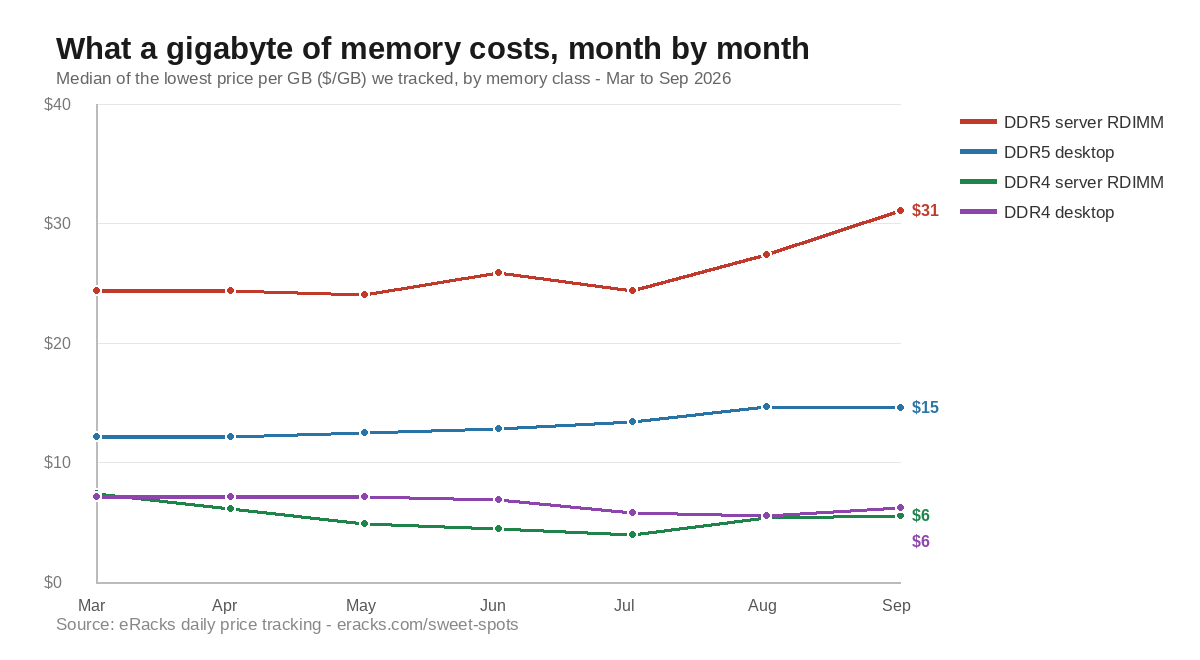
- DDR5 server memory (ECC RDIMM): $24.37 to $31.05 per GB, up 27 percent; the best available price went from $14.17 to $26.75, up 89 percent.
- DDR5 desktop memory: $12.19 to $14.58 per GB, up 20 percent.
- DDR4 server memory (ECC RDIMM): $7.44 to $5.56 per GB, down 25 percent.
- DDR4 desktop memory: $7.19 to $6.22 per GB, down 13 percent.
Two things follow. First, the memory you did not buy in March costs a third more today, and the cheap end of the market has closed up. Second, the previous generation is being liquidated: DDR4 server memory now costs a seventh of DDR5 per gigabyte. For a file server, a backup target, or a build server, where capacity matters and bandwidth does not, a DDR4 platform with its slots filled is the best value on the table this year.
In a sealed design none of this is available to you. You pay the day-one price for the day-one capacity, and a shortage or a glut in the memory market changes nothing about the machine you own. In a slotted design, or a fabric design, the market is your friend as often as your enemy: you buy the slots now, you fill them when the price is right.
What we do about it
Every quote we write shows the board’s slot count next to what the configuration fills, so the upgrade path is visible before the order rather than discovered after it. Some customers max the memory on day one, which is the right call for a machine with a known job; the AMD EPYC 9005 boards we build on carry 24 DIMM slots and up to 6TB, so there is usually room either way. The memory line in every quote is priced at that day’s street price from the same tracking above, so a customer who asks for 256GB today and 512GB in six months pays the market twice, not our guess once. And as CXL memory expanders reach the channel, they are quotable on the EPYC 9005 and Xeon 6 platforms as a third way to add capacity without touching a socket.
Sealed memory is the right design for an accelerator, where bandwidth is the whole point. For everything else, we would rather sell you the slots.
Prices are our own daily tracking of the lowest street price per gigabyte for each major memory line at Newegg, taken as the median across lines in each class; March 2026 versus September 2026.
joe September 17th, 2026
Posted In: News, servers, Technology
Tags: CAMM2, CXL, DDR4, DDR5, ECC RDIMM, EPYC 9005, HBM, memory price tracking, server memory prices, upgradeability