
eRacks Systems Tech Blog
Open Source Experts Since 1999
Refurbished, Renewed, and Burned In: What We Do to a Used GPU Before It Ships
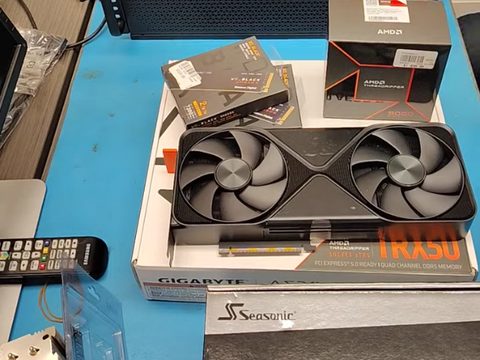
This week a customer’s IT team asked us for “more details on your refurb process”. One of them had already asked an AI assistant, which summarized our process from our own website: a 72-hour burn-in, fans checked, thermal pads refreshed. It got most of it right. Here is the full answer, from us.
Why refurbished at all
Our new systems ship with new parts, bought through authorized US distribution and validated-new sources, and that stays the default. Some customers ask for something else on purpose. The AMD Threadripper 3000 series is a good platform that distributors no longer carry. The GeForce RTX 3090 is the last GeForce card with NVLink (NVIDIA’s bridge that links two cards’ memory), which matters for some training work, and a pair of them costs a fraction of a current professional card. For builds like these the parts can only come refurbished or renewed, and we are glad to build them.
The words cover a lot of ground, though. “Refurbished” can mean a part that was properly reworked, or a used part that was wiped down and relisted. Our components page describes the other end of that market: “clean pull” lots with a short broker warranty, and server CPUs locked to their first owner’s firmware. We don’t buy from that market. Our refurbished cards come from refurbishers who back them with a warranty, and then every refurbished part goes through our own process.
What we do to a refurbished part
- Inspection. Every part is checked when it arrives, and anything that doesn’t meet our standards goes back. Not every “refurbished” or “renewed” part passes; we have rejected and returned some.
- Rework on the cards. We check the fans and replace them as needed, and we always replace the thermal compound or pads (the material that carries heat from the chip to the cooler). Worn connectors, plugs or jacks get replaced, and visibly marginal solder joints get resoldered. Then the card is cleaned and reassembled.
- Assembly. Everything is double- and triple-checked, neat, clean and properly cabled, and every card has to be recognized by its driver before we go further.
- Operating system and test suite. The OS and drivers go on, with our own utilities and our testing and burn-in suite.
- Burn-in. 72 hours of testing under full load, CPU, memory and every GPU together, including overnight runs and several multi-hour burn-ins, with temperatures logged and the driver logs watched for errors. If a part fails, we replace it and restart the burn-in from zero.
- The AI stack. On an AI server the stack goes on last, and the system is benchmarked with real models and tested before it ships.
The 72 hours are the same burn-in every eRacks system gets. The 24-hour minimum on our components page is typically for rush orders.
What it means for you
When a quote includes a refurbished or renewed part, it says so, line by line. Refurbished GPUs carry a 1-year warranty. And the system they go into gets the same assembly, the same checks and the same 72-hour burn-in as a system built entirely from new parts.
Looking at a previous-generation build, a pair of NVLinked cards, or an AI server on a budget? Browse our AI rackmount servers, or write to us at info@eracks.com and tell us what you need.
joe October 29th, 2026
Posted In: News, Technology
Tags: AI server, burn-in, eRacks, refurbished GPU, renewed hardware, RTX 3090, Threadripper
eRacks/GAMER: A Linux Gaming PC That Boots Straight Into Steam
We have built Linux machines since 1999, and for most of that time gaming was the one thing people told us Linux couldn’t do. That changed. Valve’s Proton (a compatibility layer built into Steam that runs Windows games on Linux) and the Steam Deck turned Linux into a real gaming platform. So we built a proper desktop gaming model, with all the bells and whistles: eRacks/GAMER.
What it is
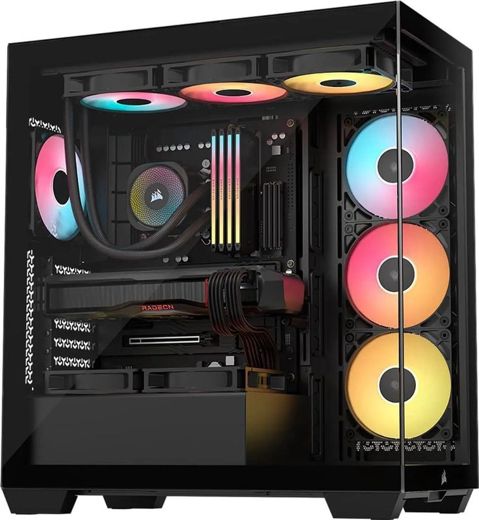
eRacks/GAMER is a tower built to order, starting at $4,395 with an AMD Ryzen 7 9700X, an AMD Radeon RX 9070 XT with 16GB, 32GB of DDR5-6000 RGB memory and a 2TB WD Black NVMe drive (fast solid-state storage). It sits in a panoramic tempered-glass case, black or white, with three ARGB (addressable RGB) fans and a 360mm ARGB liquid cooler, on an AM5 X870 motherboard with Wi-Fi 7 and 2.5Gb Ethernet, powered by an 850W ATX 3.1 supply.
From there the configurator goes where you want it: Ryzen X3D processors up to the 16-core Ryzen 9 9950X3D2 (X3D chips carry AMD 3D V-Cache, extra on-chip cache that AMD aims at games), GeForce RTX 5070, 5070 Ti and 5080 cards, 64GB of memory, 4TB of storage, and the lighting set the way you like it: a synced rainbow, one color, or off.
It boots into Steam
GAMER ships with Bazzite, a Fedora-based gaming system that boots into Steam Gaming Mode, the full-screen, controller-friendly interface from the Steam Deck. Steam comes installed with Proton, along with Heroic for Epic and GOG libraries, Lutris, GameMode and MangoHud (an on-screen frame-rate and temperature overlay). Sign in with your own Steam account and your library is there.
Prefer something else? Ubuntu with Steam is in the menu, and so are Fedora, Nobara, CachyOS, Pop!_OS and Mint. Every one gets the same gaming stack, installed and tested before it ships.
Why not SteamOS?
We asked ourselves the same thing. SteamOS is Valve’s own, and Valve supports it on its own hardware plus one Lenovo handheld: its FAQ lists the Steam Deck, Steam Machine, Steam Frame and Lenovo Legion Go S as the only devices “Powered by SteamOS”. On desktop PCs, AMD graphics are in beta and NVIDIA isn’t supported, and Valve’s own SteamOS page says not to treat it as a replacement for a desktop operating system. Bazzite gives you a Steam Gaming Mode like SteamOS’s, plus NVIDIA drivers and a full desktop. If you want SteamOS anyway, it is an option on Radeon builds.
The games that lock Linux out
Proton runs Windows games on Linux. The exception is a handful of online games whose publishers have decided Linux players aren’t welcome: their anti-cheat software refuses to run on Linux, and you’re shut out for no reason except your choice of operating system. The community list at areweanticheatyet.com tracks them. As of today it shows Valorant and Fortnite as denied, and recent Call of Duty titles as broken.
We think that’s the wrong call. We’d rather send our customers to the studios that support Linux players, and there are plenty of great games that welcome you. We also understand that some games are compelling enough that people play them anyway, whatever their publisher’s appetite for control. If that’s you, it’s your machine: tell us what you want, Windows dual boot included, and we’ll build it that way.
On the couch, on the TV
Plug GAMER into the living-room TV and Steam’s Big Picture mode turns it into a console. Or leave it at your desk and stream to the TV with Steam Remote Play: Valve’s Steam Link app runs on Apple TV, Android TV and Amazon Fire TV. Add up to four Xbox, DualSense or 8BitDo controllers in the configurator, or Valve’s new Steam Controller by quote (Valve sells it through a reservation queue).
Streaming your games instead? Add a 4K capture card, a USB microphone, and Discord and OBS Studio preinstalled.
A word on prices
Graphics cards cost more than they did a year ago. On October 5, 2025 we priced the GeForce RTX 5070 Ti at $799 at Newegg; this morning the lowest new, in-stock 5070 Ti there was $1,169.99. The Radeon RX 9070 XT went from $799 in April to $879.99 today. That is one reason the RX 9070 XT is our default: it is the better match for Linux and SteamOS, and today it costs about $290 less than the 5070 Ti. The 5070 Ti is one click away if you want it.
For the longer version, with sources, see our Linux gaming PC guide. Ready to build one? Configure eRacks/GAMER, or write to us at info@eracks.com.
joe October 16th, 2026
Posted In: News, Technology
Tags: Bazzite, eRacks/GAMER, gaming PC, Linux gaming, Proton, Steam, SteamOS
How We Came to KVM: Tucson 2007, Napa 2008, and Why We Built eVirt

In our last post on virtualization I promised the story of how we came to KVM, the Kernel-based Virtual Machine. Here it is. It starts in a resort outside Tucson in August 2007, at the first KVM Forum, and it ends with the small piece of software our own servers still run on.
Tucson, August 2007
The first KVM Forum ran from August 29 to 31, 2007, at the Loews Ventana Canyon in Tucson. KVM had been in the mainline Linux kernel for about six months by then: it arrived in version 2.6.20 in February, as a driver for the hardware virtualization features in Intel and AMD processors. Avi Kivity, who started it at a small company called Qumranet, opened the forum with a talk titled “KVM, One Year On”.
I went expecting to learn more about the Linux kernel and about virtualization. What I found was a technology that was going to change where virtualization went. The default answer in 2007 was Xen, a separate hypervisor that ran underneath Linux. By my count at the time it was roughly ten times the code, and its host side lived outside the kernel. KVM took the opposite approach: Linux itself becomes the hypervisor. The scheduler, the memory manager and the device drivers are the ones the kernel already has, so every improvement to Linux is an improvement to the hypervisor for free. Sitting in that room, it was obvious to me that this would replace the virtualization engines of the day. It largely has.
Two moments that stuck
The first was meeting Avi Kivity and having drinks with the whole Qumranet crew, including Benny Schnaider, the CEO, who closed the forum with the final keynote. I was so impressed with Avi: his intuitive grasp of everything he was doing, and the mental bandwidth he had for all of it at once.
The second was in a session with Rusty Russell, the kernel developer who wrote ipchains and then iptables, the Linux packet filter behind countless firewalls. His talk in Tucson was about lguest, his deliberately minimal hypervisor, but the remark I remember was about iptables. He said, more or less, that iptables was never intended as an end-user product. It was a toolkit for building one. That changed how I looked at the whole stack. The kernel gives you good tools. The product layer on top should be small, opinionated and yours, and it should not try to re-wrap every tool underneath it.
Napa, June 2008
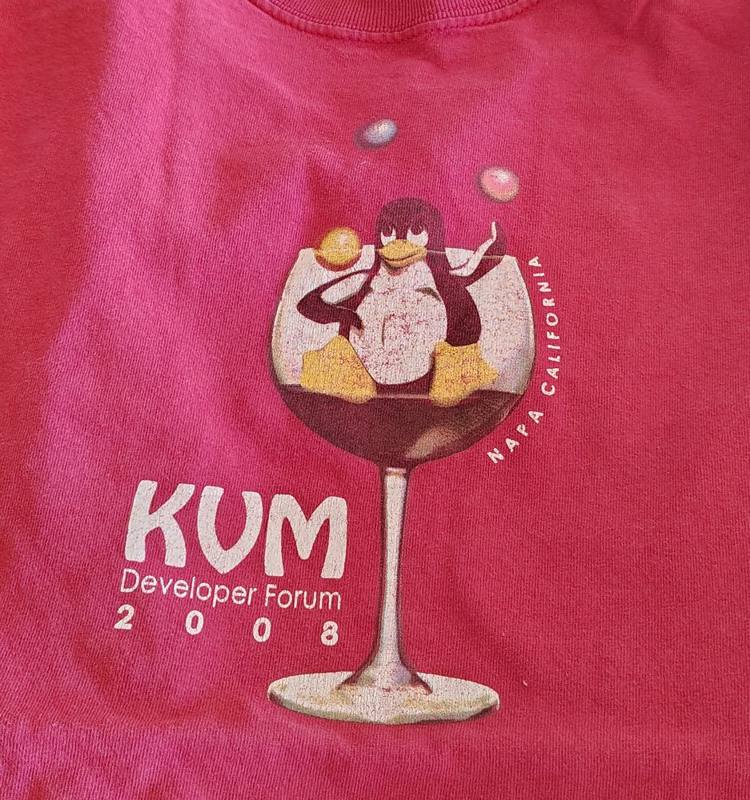
The second forum moved to the Napa Valley, June 11 to 13, 2008, and the agenda showed how fast things were moving: Mac OS X running in KVM, memory sharing between virtual machines, passing physical devices straight through to a guest. Three months later, in September 2008, Red Hat bought Qumranet for $107 million. KVM was no longer an interesting experiment. It was the future of Linux virtualization, and by then we were already running it.
What libvirt got wrong
The obvious way to manage KVM then, and still the way most guides assume, was libvirt. It did not work for us. In 2008 it was full of stubs and unimplemented features, and it rewrote the surface area for getting anything done, so that using it was more work than going directly to the QEMU commands underneath. QEMU is the machine emulator that KVM accelerates; it already had a perfectly good command line and monitor.
Then there was the XML. Every machine became an XML document, and XML as a configuration format is a disaster of invalid states: documents that parse but do not mean anything, settings that conflict, and no good way to see what the machine will actually do until you run it. The industry has largely moved on to simpler configuration languages since. To be fair, libvirt has picked up a few redeeming features over the years. In my view it is still not worth it, which is Rusty’s point exactly: a tool that tries to be the product ends up harder to use than the toolkit it wraps.
The first eVirt
So we built the opposite. The first eVirt did one thing: it launched virtual machines from a simple configuration file with well chosen defaults, talking to QEMU directly. It took a tiny fraction of the code of anything built on libvirt, and we have used it in production ever since. The current version, the fourth, keeps the same idea: a short YAML file per machine (CPU, memory, disks, bridge, fixed address), an Ubuntu cloud image seeded with cloud-init, and one command to build or rebuild it. Our own web, mail and lab servers are defined that way, and I described it in more detail in the last post.
What it taught us
Nearly two decades later, the lessons from those two forums are still how we build. Put the hard parts in the kernel, where they get the most eyes and the longest support. Keep the layer on top thin enough that you can read it, replace it, or skip it. And treat the management tools as a choice, not a commitment: a virtual machine disk is a file, and a good host lets you change your mind.
That is why our default virtualization host is still Ubuntu Server with KVM, and why we install whatever management layer a customer asks for: libvirt with Cockpit or virt-manager, Proxmox, Incus, IncusOS or XCP-ng. If you would rather run what we run, we install eVirt on a consulting basis.
Planning a virtualization build, or moving off a platform that has started sending license invoices? Write to us at info@eracks.com, or start with a quote request.
joe October 8th, 2026
Posted In: News, servers, Technology
Tags: eVirt, KVM, KVM Forum, libvirt, Linux kernel, QEMU, virtualization