
eRacks Systems Tech Blog
Open Source Experts Since 1999
From 144TB to 2.6PB: The 2026 Storage Market and Why On-Premise NAS Is Back
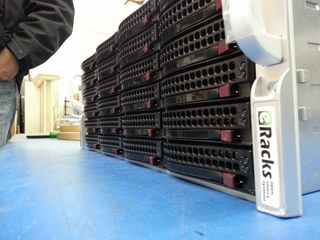
The data storage market in 2026 is doing something unusual: it’s both growing fast and getting cheaper per terabyte at the same time. Global storage requirements are projected to nearly double by 2029, hitting roughly 20,000 exabytes. The NAS hardware market alone is forecast to grow from $55B today to $173B+ by 2034 – a 15.5% CAGR. And while all that’s happening, 30TB+ enterprise SATA drives have become genuinely mainstream, with retail prices that put petabyte-scale on-premise storage within reach of mid-sized organizations for the first time.
Meanwhile, the cloud-storage decade is hitting a wall. Egress fees on AWS, Azure and GCP have only gone up. Ransomware losses keep climbing. Healthcare, legal, finance, and government buyers are all asking the same question they used to leave for the IT department: where, exactly, is our data? The answer “somewhere in us-east-1” doesn’t satisfy a HIPAA auditor, a SOC 2 attestation, or a court order anymore.
The on-premise comeback is a hardware story
For years, the argument against running storage in your own rack was capex vs opex – “cloud is cheaper because you don’t buy hardware.” That math has flipped for any organization storing more than a few hundred TB. A 36-bay NAS loaded with 24TB drives gives you nearly a petabyte of raw storage for the price of about 8-10 months of equivalent S3 storage at production-tier rates – and the hardware keeps working for 5-7 years after that.
Three things made it flip:
- HDD prices at historic lows. 28TB and 30TB enterprise drives now sell for under $20/TB. A decade ago, that was 2TB-drive territory.
- ZFS and modern Linux file systems matured. ZFS in particular – with built-in checksumming, snapshots, replication, and dedup – has become the default storage layer for serious on-premise deployments. No vendor lock-in, no licensing tax.
- Cloud egress is the new vendor lock. Pulling 100TB out of S3 to migrate workloads costs more than the hardware that would store it locally for 5 years.
The eRacks NAS lineup
Our rackmount NAS line covers everything from a small workgroup file server to true petabyte-scale storage chassis. All ship with real Ubuntu Linux (your choice of file system – ZFS, XFS, or Btrfs), enterprise components (ECC RAM, redundant power supplies, hot-swap bays), and zero proprietary management software. The OS is yours, the data is yours, the hardware is yours.
| Model | Form | Bays | Max Raw | Starting |
|---|---|---|---|---|
| NAS4 | 1U | 4 | 144TB | $1,895 |
| NAS6 | 2U | 6 | 180TB | $2,795 |
| NAS8 | 2U | 8 | 240TB+ | $3,695 |
| NAS12 | 2U | 12 | 360TB | $4,695 |
| NAS16 | 3U | 16+2 | 288TB | $6,595 |
| NAS24 | 4U | 24 | 720TB | $8,995 |
| NAS36 | 4U | 36 | ~1PB | $10,495 |
| NAS50 | 9U | 50 | 1.3PB | $13,595 |
| NAS60 | 4U | 60 | ~2PB | $15,995 |
| NAS72 | 4U | 72 | 1.5PB+ | $19,995 |
| NAS100 | 4U | 102 | 2.6PB | $24,995 |
Starting prices are barebones (chassis, motherboard, PSU); add drives, RAM, OS choice at configuration. Custom builds welcome.
What you actually run on it
Because we don’t ship a proprietary OS, you get to pick the storage stack that matches your workload. Common combinations our customers deploy:
- File systems: ZFS (default for most deployments), XFS, Btrfs
- NAS / file sharing: TrueNAS, OpenMediaVault, Samba, NFS, iSCSI
- Distributed storage: Ceph, BeeGFS, MooseFS, LizardFS – for multi-node clusters and HPC workloads
- Object storage: MinIO (S3-compatible) – increasingly popular as a local target for AI/ML training datasets
- Private cloud: NextCloud, Seafile, OwnCloud, Proxmox VE, CloudStack
- Backup & sync: Bacula, BorgBackup, restic, rsync, Duplicati
Pre-installed and tested before shipping, or shipped bare for you to provision however you like – your call at order time.
Who’s actually buying these in 2026
Six segments dominate our NAS pipeline this year:
- SMBs and mid-market IT trying to escape per-GB cloud bills that have crept past the cost of hardware ownership
- Media and production companies with growing 4K/8K video libraries (one production house can fill a 720TB NAS24 in a year)
- Healthcare and medical practices with HIPAA and patient-data sovereignty requirements that rule out major cloud providers
- Legal firms archiving case files, depositions, and discovery materials that simply cannot leave the building
- AI/ML teams needing local high-speed datasets for training – typically pairing a NAS24 or NAS36 with our AI server line for the GPU compute side
- MSPs and IT consultancies building private cloud infrastructure for clients who want SaaS economics without surrendering data ownership
What we don’t do
We don’t build consumer NAS appliances. There’s no fancy iOS app to manage your photos. We don’t license a proprietary OS or lock you into a vendor ecosystem. If you want a four-bay desktop box with a slick web UI for your home media collection, we’re not your shop – and that’s fine, lots of good vendors serve that market.
What we do build: enterprise rackmount storage on standard Linux, configurable to your exact spec, that you fully own and can replace any component on. The same approach we’ve taken since 1999.
Get the configuration right
Drive count, RAID level, networking (10/25/100GbE), RAM (1GB per TB is the rule of thumb for ZFS), and OS choice all matter. Reply to this post or hit our contact page with rough requirements and we’ll spec it for you – usually same day.
joe April 8th, 2026
Posted In: Backups, Linux, Open Source, Rackmount Servers, servers, Storage
Tags: backup, ceph, Cloud Storage Server, eRacks, eRacks signature service, eRacks/NAS24, eRacks/NAS36, eRacks/NAS50, MooseFS, NAS, NAS24, NAS36, NAS50, NAS72, Privacy, Rackmount, sata
USB 3.0 and SATA 3: Is It Worth It?
Two new high speed buses have recently become available to consumers, USB 3.0 and SATA 3. But are they worth considering now, or should you wait until they’ve been around for a while? Let’s first examine the differences between these interfaces and their predecessors, then take a look at the devices that are available and their associated costs and finally determine whether or not we should consider investing in them so soon.
What is USB 3.0?
USB 3.0 is the latest generation of the Universal Serial Bus standard, and was released in November 2008. USB has been in existence since 1994 and has been popular since 1998 with the release of the 1.1 revision, thanks to the true plug and play nature of the interface.
USB 2.0, the most common revision of the standard in use today, was released in April 2000, and supports a theoretical maximum data transfer rate of 480 Mbits/s, or 60MB/s. By contrast, USB 3.0, which was fully specified in November 2008, supports a theoretical raw maximum of 5 Gbits/s, or ~600MB/s, and is believed by the developers of the standard to be reasonably capable of sustaining 3.2Gbits/s, or ~400MB/s. Thus, USB 3.0 is roughly 10 times as fast as its predecessor.
Devices supporting USB 3.0 have been available to consumers since January 2010.
What is SATA 3?
Similarly, SATA 3 is the successor to the highly successful SATA 2 standard. Short for Serial Advanced Technology Attachment, SATA has been around since 2003. Both SATA 1 and SATA 2 were widely adopted and quickly grew popular, superceding the archaic IDE interface.
The final revision of the SATA 3 standard, released in May 2009, supports a theoretical maximum raw throughput of 6Gbits/s (in practice, peak throughput reaches ~600MB/s), twice the bandwidth of SATA 2 at 3Gbits/s, which itself is twice the bandwidth of SATA 1 at 1.5Gbits/s.
Devices supporting SATA 3 have been available to consumers since June 2010.
Is It Worth It?
First, let’s consider USB 3.0. Currently, there are a few USB thumb drives and external hard drives available that take advantage of the new standard. Unlike USB 2.0, which only supports a maximum of 60MB/s, USB 3.0 is capable of sustaining the highest data transfer rates hard drives can offer and more. USB 3.0 thumb drives are significantly more expensive than their USB 2.0 counterparts, but the external hard drives aren’t that much more expensive (the price difference between a USB 2.0 and a USB 3.0 external 1TB hard drive is only $10-$20), and given that two USB 3.0 ports will only cost you somewhere around $50, it might be worth upgrading if you have a need to access external storage quickly.
Now, what about SATA 3? Right now, you can purchase a Western Digital 1TB SATA2 drive for about $70.00. Conversely, a Western Digital SATA 3 disk of equal capacity will cost you about $95.00. The price difference between these two is only $25.00, so it’s not that much more expensive if you decide you’d like to double your bandwidth.
Keep in mind that if you’re using a 1x PCI-E SATA 3 controller, you won’t get the full 6Gb/s, but only ~4Gb/s. This is a limitation of the 1x PCI-E slot. With this in mind, if you’re not going to use an onboard SATA 3 controller, you’ll want to get a 4x card.
What eRacks Can Do for You
eRacks prides itself in staying up to date with the latest technologies. We currently offer on our high end models, upon request, support for both USB 3.0 and SATA 3, and can also build custom systems. Visit the eRacks website and place an order or request a quote today!
james September 7th, 2010
Posted In: Uncategorized