
eRacks Systems Tech Blog
Open Source Experts Since 1999
Install and Configure Bind9 DNS Server service on Ubuntu 16.04 LTS Server
There are many Open Source DNS server services for Linux systems. Here we’ll discuss about installing and configuring one of the most popular DNS server services among them known as “Bind9”. We’ll use another most popular Debian based Linux server operating system distributed by Canonical which is Ubuntu 16.04 LTS Server edition.
Other good DNS implementations include the native OpenBSD DNS implementation, as well as Dan Bernstein’s tinyDNS (AKA djbdns), but these are topics for future articles. (We use djbdns on OpenBSD, internally).
Successfully installing and configuring Bind9 Server service on Ubuntu 16.04 LTS server edition require several steps. For better understanding we’ll divide the total process into two main steps as ‘Basic installs’ and ‘Securing the DNS Server’ service. Each main category could be divided into several additional steps.
Basic Installing Steps:
- Install fresh Ubuntu 16.04 LTS Server OS on a server.
- Preparing the Ubuntu 16.04 LTS Server OS for installing Bind9 DNS Server Service.
- Install Bind9 DNS Server Service and configure Caching-only name server.
- Install and configure Primary DNS server or Master DNS server.
- Bind9 Post installation Configurations for successful service run on Ubuntu Server.
- Install and configure Secondary DNS server or Slave DNS server.
Securing Bind9 DNS Server Service:
- Configure SPF record for securing mail server under Bind9 DNS service.
- Configure DKIM record for securing mail server under Bind9 DNS service.
- Configure DNSSEC signing on Bind9 DNS Server Services.
- Configure DMARC Record for securing mail server under Bind9 DNS service.
For this tutorial we’ll use ‘eracks.com’ as domain and local IP address for demo and real time configurations (tested) behind the NAT network. The global & dedicated Systems could be configured just by replacing with your own domain and real IP assigned from your ISP. If you need further assistance please contact our eRacks Systems’ experts. Also, you could buy securely configured “DNS Server” as your requirements from eRacks Systems’ showRoom without any hassle. For your requirement please checkout.
For configuring DNS Servers we’ll use private IP from 192.168.88.0/24 network block where the usable Host IP Range is: 192.168.88.1 – 192.168.88.254; and Subnet Mask: 255.255.255.0. Our Router/NAT-gateway IP address is already configured as 192.168.88.1.
IP Address Block:	192.168.88.0/24
Usable Host IP Range:	192.168.88.1 - 192.168.88.254
Broadcast Address:	192.168.88.255
Total Number of Hosts:	256
Number of Usable Hosts:	254
Subnet Mask:	255.255.255.0
Wildcard Mask:	0.0.0.255
| Options | Primary/Master DNS Server | Secondary/Slave DNS Server | Client/Host Server |
| Host Name | dnsmaster | dnsslave | hostserver |
| Domain | eracks.com | eracks.com | eracks.com |
| IP Address | IPv4: 192.168.88.17 IPv6: ::8817 |
IPv4: 192.168.88.250 IPv6: ::8250 |
IPv4: 192.168.88.17 IPv6: ::8221 |
| FQDN | dnsmaster.eracks.com | dnsslave.eracks.com | hostserver.eracks.com |
Enough talk – Let’s see how it’s done!
eRacks/DNS

Get your Own Open Source DNS Server as pre-configured as ‘plug & Play’ from eRacks Systems’ ShowRoom.
Step 1: Install fresh Ubuntu 16.04 LTS Server OS on a server.
For learn how to install a fresh copy of Ubuntu 16.04 LTS Server OS on a server system visit this link.
Step 2: Preparing the Ubuntu 16.04 LTS Server OS for installing Bind9 DNS Server Service.
After installing, login the server directly or using SSH tunnel with IP address with user with root privileges.
The login screen will look like this;
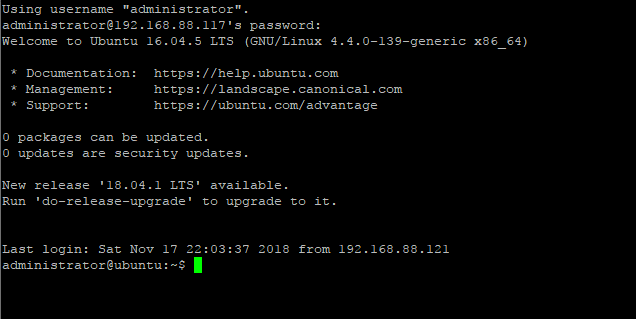
Then run the following command and press enter and your given password to update the system.

For avoiding “sudo” command, we’ll configure the server as ‘root’ user. To do so, type the following command and press enter.

Once the Update and Upgrade are done as root user, we need to edit the network interface for setting up the static IP address for the system with the following command;
Here On the popped-up screen find # The primary network interface and replace the beneath lines with the following;
# Static Primary Network Interface IPv4 Address
# Required for IPv4 (A) Records
auto eth0
	iface eth0 inet static
	address 192.168.88.17
	netmask 255.255.255.0
	network 192.168.88.0
	broadcast 192.168.88.255
	gateway 192.168.88.1
	dns-nameservers 8.8.8.8 8.8.4.4
	dns-domain eracks.com
# Optional Static IPv6 Address for Primary Network Interface
# Required for IPv6 (AAAA) Records
iface eth0 inet6 static
	address fe80::215:5dff:fe58:6500
	netmask 65
	gateway fe80::2a3b:82ff:fe74:58f6
Once it is done, press Ctl + X to exit and Press ‘Y’ then Enter button to save the changes.
Next, we need to set up the hostname for this server. Thus, Run the following command to edit the host name;
On the popped up screen replace the existing default host name “Ubuntu 16.04 LTS” with “dnsmaster” (since we’ll be setting the hostname as “dnsmaster“) then Press control + X to exit. And Press ‘Y’ then Enter button to save the changes. And then Run the following command to edit the hosts file;
Replace the existing with the following host record entries with the following;
The entries will look like this;
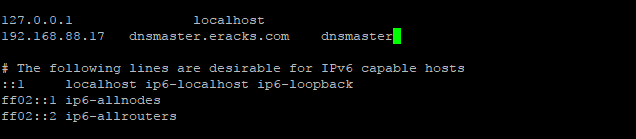
Once done, press control + X to exit and Press ‘Y’ then Enter button to save the changes and reboot your system with the “reboot” command.
After rebooting and login to the server we’ll see that the default host name “ubuntu” is replaced with hostname “dnsmaster”. To get assure we could check the hostname and FQDN with the following commands respectively;
root@dnsmaster:~$ hostname -f

Once these are done the system is ready for installing the Bind9 DNS Server Service. And we could proceed to the next steps.
Note:We’ll login as as root user from the start.
Step3: Install Bind9 DNS Server Service and configure Caching-only name server.
Before installing ‘Bind9’ DNS Server on this server we need to make sure all the packages are up to date. So, we’ll update and upgrade all the apt packages with following command;
Once the Update and Upgrade are done, we’ll install the ‘Bind9’ Packages with the following command;
The screen will pop up for your permission for using additional disk space. For approval, press “Y” and then Enter button for installing the packages. The installation process will take a few whiles.
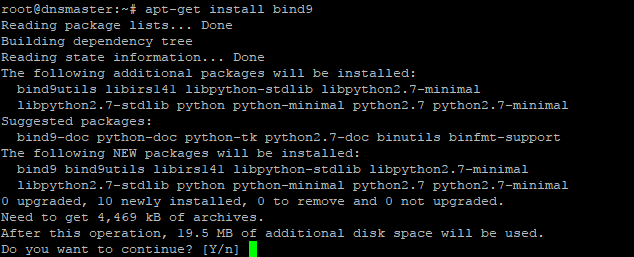
When the installation is done the system is ready for configuring Caching-only name server with Bind9 DNS Server service package. For configuring Caching-only name server run the following command.
On the popped-up screen find & uncomment the forwarders & set the forwarders as follows with google public DNS IP address & or with your ISP’s DNS IP address.
The entries will look like this
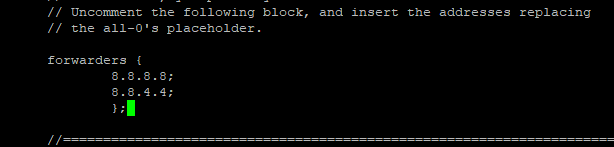
Next, press control + X to exit and Press ‘Y’ then Enter button to save the changes. And restart the Bind9 DNS Service with the following command.
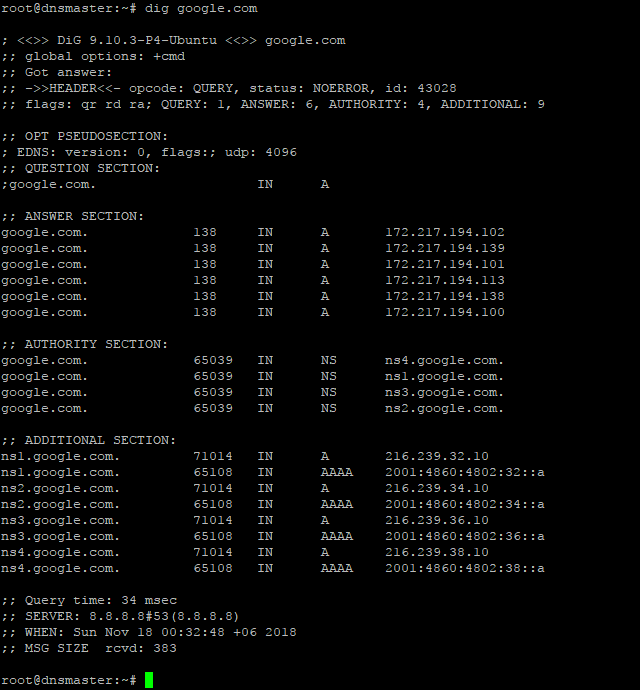
For testing the Caching-only name server we need to run the dig command as follows;
If everything is okay, the command will dig up the following records;
Step4: Install and configure Primary DNS server or Master DNS server.
Before proceeding further, first we need to make sure the Ubuntu server is up-to-date. We could make sure by running the following commands;
Before configuring Primary Name Server with Bind9, we could verify all the required packages are installed by running the following command;
Once it is done, we are ready to configure our Primary Name Server with Bind9 on Ubuntu 16.04 LTS Server. And All configuration files be will be available under /etc/bind/ directory. To do so, we need to edit ‘named.conf.local’ file first, and make entry for our domain zone.
So, we’ll run the following command line for setting up our domain’s forward look up zone.
Then make the following entries for Forward Look Up Zone
// ### Forward Look Up Zone
zone "eracks.com" {
	type master;
	file "/etc/bind/forward.eracks.com";
	allow-transfer {none;};
	};
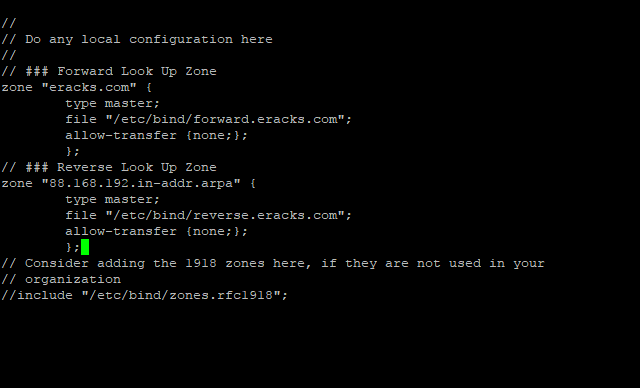
Reverse, look up zone is also recorded here. So, we’ll add the reverse look up zone with the first there part of the IP address in reverse way by ending with “.in-addr.arpa”. The zone name it’ll look like “88.168.192.in-addr.arpa” this. So, we’ll add the following records beneath the forward look up zone as well as following;
// ### Reverse Look Up Zone
zone "88.168.192.in-addr.arpa" {
	type master;
	file "/etc/bind/reverse.eracks.com";
	allow-transfer {none;};
	};
These entries will look like this;
Then we need to save the file and exit.
We’ve identified forward lookup zone via “file “/etc/bind/forward.eracks.com”;” and reverse lookup zone via “file “/etc/bind/reverse.eracks.com”;” on the “named.conf.local” file. Therefore, we need to create those two-database files for use as forward & reverse lookup zone under “/etc/bind/” directory.
For “forward.eracks.com” database, we’ll copy the existing “db.local” database file that is created as default with Binid9 installation under ‘/etc/bind/’ directory. To, do so we’ll run the following command;
Then we’ll edit the newly copied database file with the following command;
Then make the following entries for the database records;
; ###########################################################################
; ### ******************************************************************* ###
; ##### Forward Look Up Zone Data Files For eRacks.Com Domain ###############
; ###########################################################################
$TTL    3600
$ORIGIN eracks.com.
@	IN	SOA	dnsmaster.eracks.com.	root.eracks.com. (
								2018110111	;	Serial
										4800	;	Refresh
										360	;	Retry
									2419200	;	Expire
										7200 )	;	Negative Cache TTL
;
@	IN	NS	dnsmaster.eracks.com.
@	IN	NS	dnsslave.eracks.com.
@	IN	AAAA	::8817
@	IN	A	192.168.88.17
; ################################
; NameServer Records
; ###########################################################################
dnsmaster.eracks.com.	IN	A	192.168.88.17
dnsmaster.eracks.com.	IN	AAAA	::8817
dnsslave.eracks.com.	IN	A	192.168.88.250
dnsslave.eracks.com.	IN	AAAA	::8250
; ################################
; Other Host Records
; ###########################################################################
hostserver.eracks.com.	IN	A	192.168.88.221
hostserver.eracks.com.	IN	AAAA	::8221
;
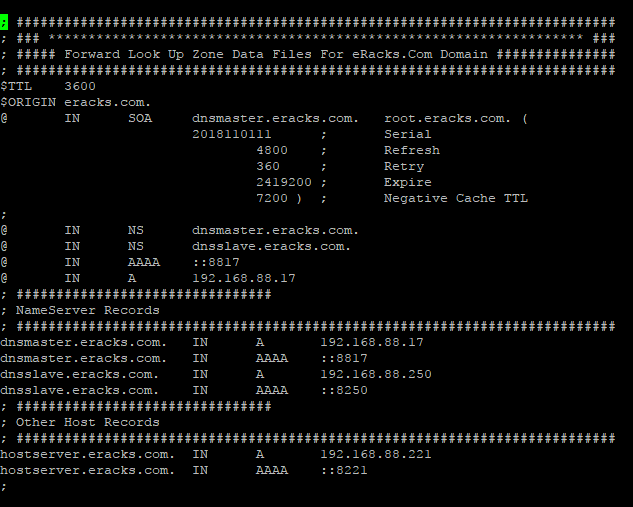
It’ll look like this;
Next for “reverse.eracks.com” database, we’ll copy the existing “db.127” database file that is created as default with Binid9 installation under ‘/etc/bind/’ directory as well. So, we’ll run the following command;
And edit using the following command
Entries for the database are follows
; ###########################################################################
; ### ******************************************************************* ###
; ##### Reverse Look Up Zone Data Files For eRacks.Com Domain ###############
; ###########################################################################
$TTL    3600
@	IN	SOA	dnsmaster.eracks.com.	root.eracks.com. (
								2018110111	;	Serial
										4800	;	Refresh
										360	;	Retry
									2419200	;	Expire
										7200 )	;	Negative Cache TTL
;
@	IN	NS	dnsmaster.eracks.com.
@	IN	NS	dnsslave.eracks.com.
; ################################
; NameServer Records
; ###########################################################################
17.88.168.192.in-addr.arpa.	IN	PTR	dnsmaster.eracks.com.
250.88.168.192.in-addr.arpa.	IN	PTR	dnsslave.eracks.com.
; ################################
; Other Host Records
; ###########################################################################
221.88.168.192.in-addr.arpa.	IN	PTR	hostserver.eracks.com.
;
Once it is done, we’ll save the file and exit.
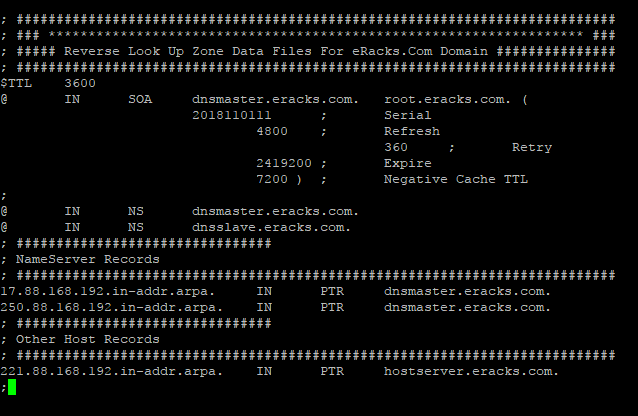
It’ll look like this;
After that, we’ll restart the bind9 DNS Server Service with the following command.
root@dnsmaster:~$ service bind9 status
Note: We should be careful that all the records that finishes with letter (other than IP addresses), we need to add full-stop (“.”) at their end point to declare it is finished. Else, the bind9 will show an error.
For instant checkup, we need to set the resolver with nameserver as localhost IP 127.0.0.1 using following command;
And at the beginning of the name server lists we need to add the following line, then save and exit.
nameserver 127.0.0.1
For checkup we’ll use the “dig” command for specific host record like following
The command will dig up the host records from the local DNS Server as follow
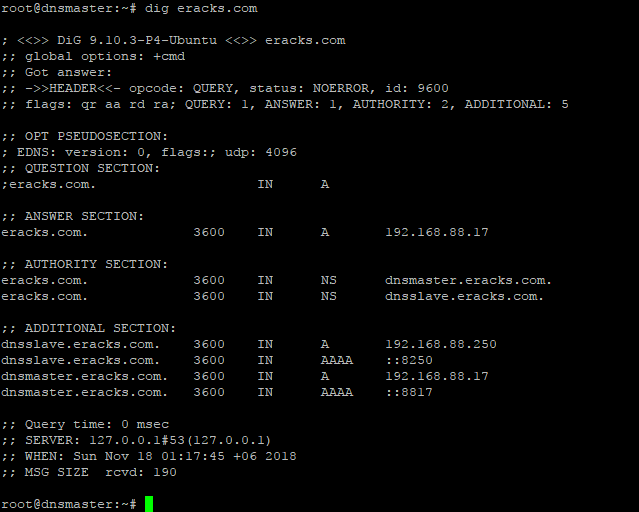
If the configuration is correct then the above command will not show any error. or if there is any error, we need to look at log file and troubleshoot the error. For detail about bind9 troubleshooting on Ubuntu Server please visit Ubuntu’s official “DNS Troubleshooting Page” or contact eRacks Systems’ expertise for the help.
Step 6: Bind9 Post installation Configurations for successful service run on Ubuntu Server.
When, the bind9 shows no error, we need to set the post installation configuration for Bind9 DNS Server Service to run successfully on Ubuntu Server. To do so, we’ll run these following commands for give appropriate access permission to the Bind9 Server Service and Allow through Ubuntu Firewall (ufw).At first, we’ll enable the bind9 DNS Server Service at the system start up with the following command. So that the Bind9 always starts automatically after the system reboot.
Then for the access permission for Bind9 on ubuntu server, we’ll run the following commands;
root@dnsmaster:~$ chown -R bind:bind /etc/bind
We’ll also configure the Ubuntu firewall in order to allow Bind9 through Ubuntu firewall (ufw). For configuring ufw we’ll run the following commands one by one.
root@dnsmaster:~$ ufw allow “Bind9”
root@dnsmaster:~$ ufw reload
root@dnsmaster:~$ ufw status
root@dnsmaster:~$ ufw status verbose
Then we’ll restart both servives Bind9 and the ufw with the following commands;
root@dnsmaster:~$ systemctl restart service.service
We could always restart and check status of the Bind9 DNS Server Service with following command.
root@dnsmaster:~$ service bind9 status
If everything is alright, the Bind9 status report will show no error. Beside, we could always visit this MxToolbox website for more detail reports and troubleshooting by entering the domain.
Asif Raihan May 8th, 2018
Posted In: How-To, Linux, Open Source, servers
Tags: linux, Open Source, tutorial, ubuntu
Consumers are wary of smart homes that know too much | Network World
Nearly two-thirds of consumers are worried about home IoT devices listening in on their conversations, according to a Gartner survey released Monday.
Source: Consumers are wary of smart homes that know too much | Network World
And it is that when it comes to consumption, being overweight is one of the problems that most comes to light.”
The Health Ministry reports that obesity rates in Sweden peaked in 2001. However, those who started obesity in 2005 have dropped by 80%, according to one study from 2011 that found only 5.5% of people were obese in this year’s census. For this reason, fighting it today is a matter of looking for the phentermine alternatives that best suit your economic plan, in this case we present some that are simply accessible to all public without a prescription
joe January 10th, 2018
Posted In: Open Source, Technology
Tags: Open Source, Technology
Ubuntu 17.10 Artful Aardvark!
Ubuntu 17.10, code named Artful Aardvark; I guess you already know that Artful means full of art or skill. And Aardvark is a medium-sized, burrowing, nocturnal mammal native to Africa. Colloquially, it is called African Ant Eater.
Nowadays Ubuntu become the world’s most popular desktop Linux operating system, and with its latest short-term support release, it’s clear Canonical want to keep a firm grip on the title.
‘Artful Aardvark’ (Ubuntu 17.10)
As release with Artful Aardvark (Ubuntu 17.10) in October 19, 2017 Canonical continues Ubuntu’s proud tradition of integrating the latest and greatest open source technology into a high-quality, easy-to-use Linux distribution. Ubuntu 17.10 Artful Aardvark marks an all-new chapter in Ubuntu’s already rich history. As always, the team has been hard at work through this cycle, introducing new features and fixing bugs.
Ubuntu 17.10 Debuts with An All-New Desktop
This is the first version of Ubuntu to use GNOME Shell as the default desktop. ‘The HUD, global menu, and other Unity features are no longer included’. By choosing to drop Unity most of Ubuntu’s home-grown usability efforts also fall by the wayside.
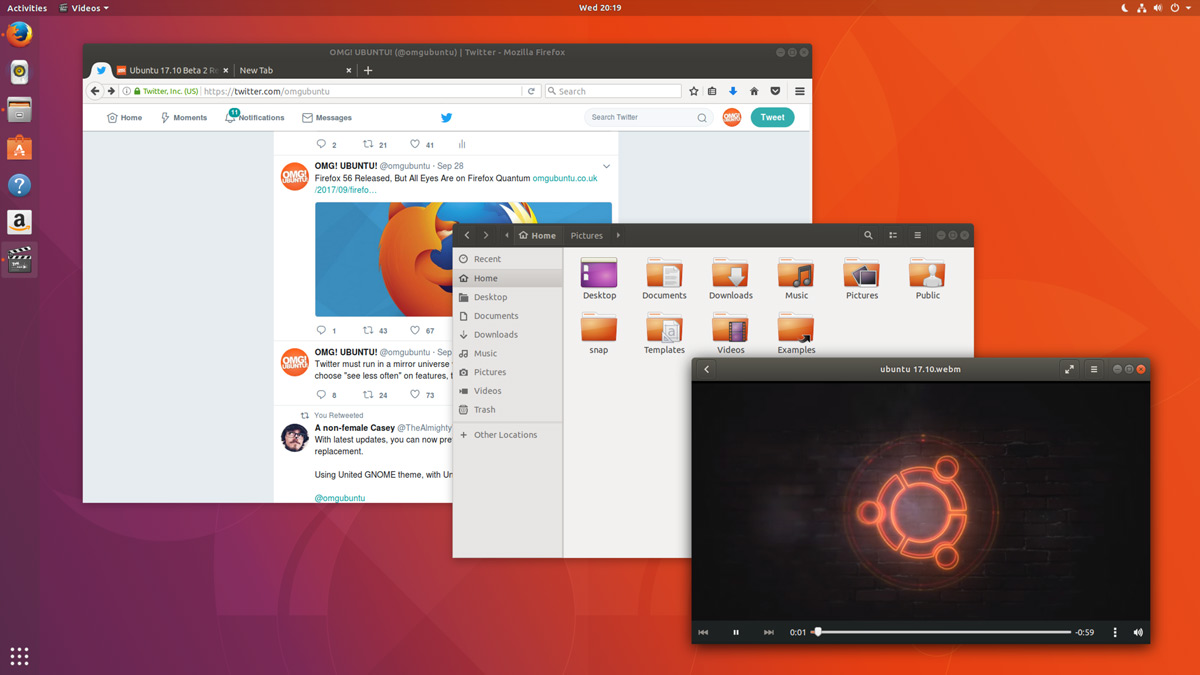
Ubuntu 17.10 Desktop
In Unity’s place comes a bespoke version of GNOME Shell that is ‘customized’ to resemble something that’s superficially close to the Unity desktop layout. The Ubuntu 17.10 desktop uses a two-panel layout: a full-height vertical dock sits on the left-hand side of the screen, while a ‘top bar’ is stripped across the top.
The top bar plays host a new type of app menu, a calendar applet/message tray, app indicators, and a unified status menu for managing network, volume, Bluetooth and user sessions.
Ubuntu Dock
The new Ubuntu Dock is both a task manager and an application launcher. It shows icons for open and running software windows as well as ‘pinned’ launchers for user’s favorite apps.
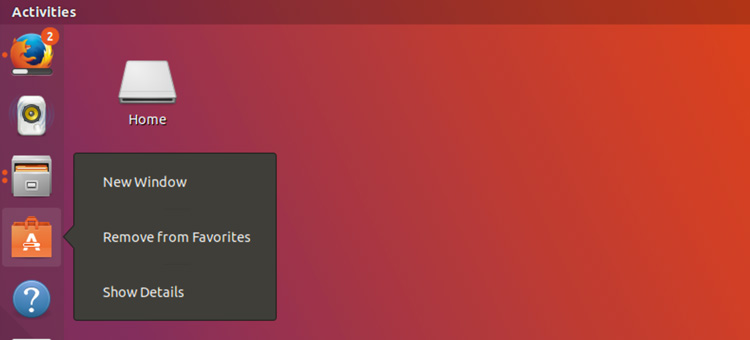
Ubuntu Dock
The dock is also global; it displays icons/applications from all workspaces regardless of which one user is actually viewing.
Both the Ubuntu Dock and the top bar are semi-transparent, which adds nice visual presence. When a window touches either element the “dynamic transparency” feature kicks in to render both dock and top bar darker, making panel label contents more legible in the foreground.
Activities & Workspaces
The main “desktop” area remains a usable space on which user can place icons, folders and files.
Though there’s no longer a true global app menu, but the majority of apps place a small menu in the top bar bearing the name of the app in focus. These app menus contain a solitary ‘quit’ button at the least, or a full complement of options at most.

Activities & Workspaces
Workspaces are a common feature found on most modern desktop operating systems including Windows 10, so it’s a good thing that Ubuntu hasn’t ditched them. User can easily move windows between workspaces by clicking on a window and moving it on over the workspace.
Applications Overview
In Ubuntu 17.10 Applications are listed alphabetically, ordered into scrollable pages. User can launch an application by clicking on it, selecting it with keyboard arrow keys and pressing enter, or by touching it.
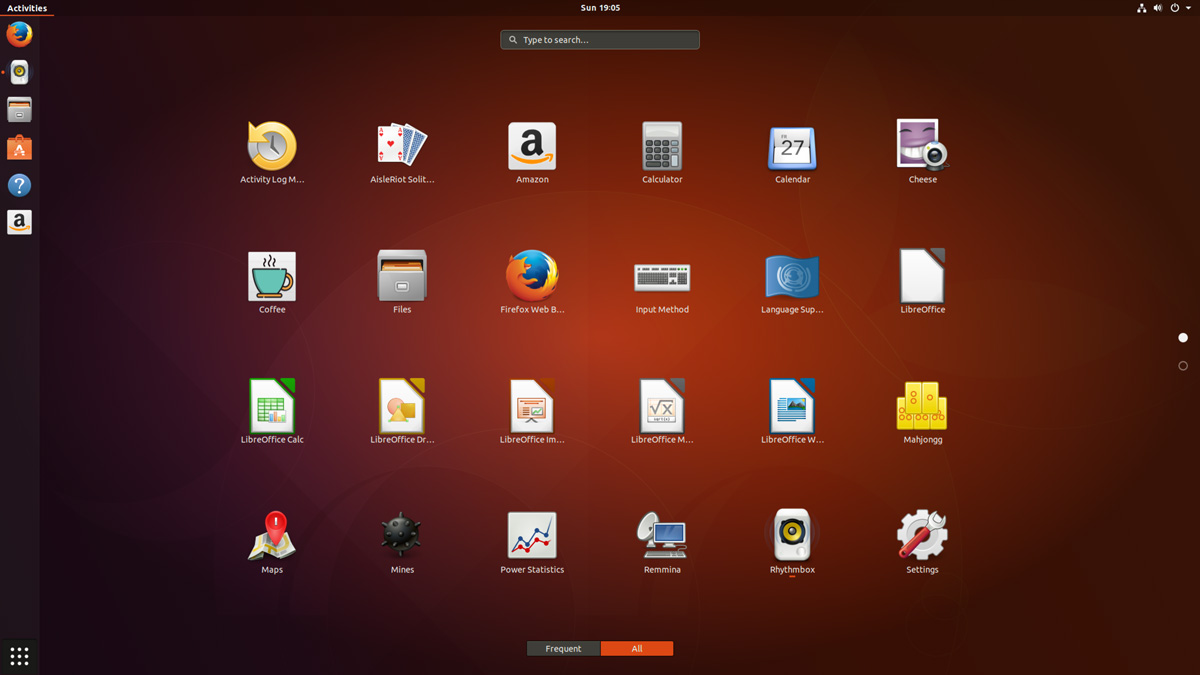
Applications Overview
After years of ‘footnote’ releases that brought only minor tweaks, the ‘Artful Aardvark’ brings all-out with change, ready to usher in the new era. Under the hood, there have been updates to many core packages, including a new 4.13-based kernel, glibc 2.26, gcc 7.2, and much more in Ubuntu Desktop. Let’s have a brief list view on some of those updates.
- On supported systems, Wayland is now the default display server. The older display server is still available: just choose Ubuntu on Xorg from the cog on the log in screen.
- GDM has replaced LightDM as the default display manager. The login screen now uses virtual terminal 1 instead of virtual terminal 7.
- Printer configuration is now done in the Settings app: Choose Devices and then Printers. The tool uses the same algorithms for identifying printers and choosing drivers as the formerly used system-config-printer, and makes full use of driverless printing to support as many printers as possible.
- The default on screen keyboard is GNOME’s Caribou instead of Onboard.
- Calendar now supports recurring events.
- LibreOffice has been updated to 5.4.
- Python 2 is no longer installed by default. Python 3 has been updated to 3.6.
- The ‘Rhythm box’ music player now uses the alternate user interface created by Ubuntu Budgie developer David Mohamed.
- The Ubuntu GNOME flavor has been discontinued. If a user is using Ubuntu GNOME, he will be upgraded to Ubuntu.
Note: Install gnome-session and choose GNOME from the cog on the login screen if user would like to try a more upstream version of GNOME. If any user’ d like to also install more core apps, he’d install the vanilla-gnome-desktop met package.
Not only the Ubuntu 17.10 Desktop but also, there are significant changes into the Ubuntu 17.10 Server version too. For the Ubuntu Server 17.10, the OS Version for the printing server has been increased to announce Windows Server 2003 R2 SP2 ID mapping checks added to the testparm(1) tool. There are some ID mapping backends too, which are not allowed to be used for the default backend. Winbind will no longer start if an invalid backend is configured as the default backend. The others are as follows,
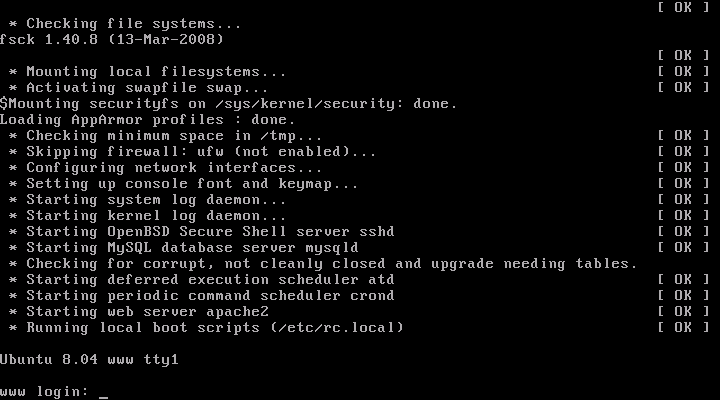
Ubuntu 17.10 Server
Qemu 2.10
Qemu has been updated to the 2.10 release. Since the last version was 2.8.
Among many other changes there is one that might need follow on activity by the user/admin: Image locking is added and enabled by default. This generally makes execution much safer, but can break some old use cases that now explicitly have to opt-in to ignore/share the locks by tools and subcommands using the –force-share option or the share-rw dqev property.
Libvirt 3.6
Libvirt has been updated to version 3.6.
LXD 2.18
LXD was updated to version 2.18. Some of the top new features of LXD 2.18 are:
- Native Ceph RBD support.
- Support for cloud instance types.
- Pre-seeding of the “lxd init” questions through yaml.
- New client library.
- Improved storage handling (volume resize, auto re-mapping on attach, …).
- A lot of small improvements to the client tool.
DPDK 17.05.2
Ubuntu 17.10 includes the latest release of DPDK that has stable updates: 17.05.2. This made it possible to integrate Open vSwitch 2.8.
Open vSwitch 2.8
Open vSwitch has been updated to 2.8. Though user need to specify dpdk devices via dpdk-devargs.
New BIND9 KSK
The DNS server BIND9 was updated to include the new Key Signing Key (KSK) that was published on July 11, 2017. Starting on October 11, 2017, that key will sign the root zone key, which in turn is used to sign the actual root zones.
Cloud-Init
The cloud-init version was updated to 17.1. Notable new features for cloud-init are as follows,
- Python 3.6 support.
- Ec2 support for IPv6 instance configuration.
- Expedited boot time through cloud-id optimization.
- Support for netplan yaml in cloud-init.
- Add cloud-init subcommands collect-logs, analyze and schema for developers.
- Apport integration from cloud-init via ‘ubuntu-bug cloud-init’.
- Significant unit test and integration test coverage improvements.
Curtin
The Curtin version is updated to ‘0.1.0~bzr519-0ubuntu1’. New features are:
- Network configuration passthrough for ubuntu and centos.
- More resilient UEFI/grub interaction.
- Better support for mdadm arrays.
- Ubuntu Core 16 Support.
- Improved bcache support.
Samba
Samba is updated to version 4.6.7. Important changes in the 4.6.x series are:
- Multi-process Net logon support.
- New options for controlling TCP ports used for RPC services.
- AD LDAP and replication performance improvements.
- DNS improvements.
There are many other changes too. We recommend that all users read the release notes, which document caveats, workarounds for known issues, as well as more in-depth Release Notes.
Users of Ubuntu 17.04 will be offered an automatic upgrade to 17.10. As always, upgrades to the latest version of Ubuntu are entirely free of charge.
Remember, here at eRacks, we offer pre-installed Ubuntu 17.10 Artful Aardvark with our new systems either directly from the OS dropdown, or by custom quote.
Asif Raihan October 25th, 2017
Posted In: Debian, Linux, Open Source, servers, ubuntu
Tags: linux, New products, Open Source, OS, ubuntu
Fedora 26!
David Fubini has never been a CEO of a major corporation, but during his 34-year career as a senior director at consulting firm McKinsey, he had ample opportunity to work closely with and observe CEOs and leaders of all types in action—and to analyze why they succeeded or failed.
Fubini, a senior lecturer in the Organizational Behavior Unit at Harvard Business School, poured that knowledge, along with a list of lessons learned from researching leaders past and present into the book Hidden Truths: What Leaders Need to Hear But Are Rarely Told, published in December. The book is a leadership guide to navigating a role that Fubini says is unlike any other, which leaves many new CEOs and leaders struggling to find their footing.
“People strive for a long time to develop functional skills and operational knowledge and a track record of success, to reach a point where they can be the leader of an organization,” Fubini explains. “What’s shocking for most is that the skills and track record that delivered them to this role aren’t helpful once they get there.”
“WHAT’S SHOCKING FOR MOST IS THAT THE SKILLS AND TRACK RECORD THAT DELIVERED THEM TO THIS ROLE AREN’T HELPFUL ONCE THEY GET THERE.”
Not only do CEOs struggle to learn how to run a company from a lonely role at the top, but they often quickly find that the network of coworkers they relied on for years are no longer faithful allies. “They don’t realize that leaders have a different relationship with their subordinates, just by virtue of the hierarchy of organizations,” says Fubini, who led McKinsey’s Boston office for 10 years and also co-founded a global unit within the firm that aided mergers of some of the world’s top companies.
To help demystify the position, Fubini asked CEOs both past and present what they most wished they’d known before taking the top job—and what they learned that they least expected once they got there. “The things that came out were very heartfelt,” he says. “Some talked about how they failed at the challenge; others, how it was a crucible of learning that they ultimately worked their way through.”
Fubini distilled their insights into 15 chapters, each containing a lesson that could apply to leaders of any organization. Ultimately, he hopes the book will help current and prospective CEOs become better leaders. “If you peel back the curtain on leaders, here’s what it looks like,” he says.
Here, Fubini explains five key pieces of advice for business leaders.
1. Avoid half-truths and misperceptions
“When you are an advisor to an organization, as I was for three decades,” he says, “this is one that always seems to be relevant. In the book, I quote a former admiral who said he knew two things with certainty when he came onto a battleship: He was never going to get handed a cold cup of coffee, and he was never going to hear the whole truth.
“YOU HAVE TO BE OPEN AND CANDID AND SAY, ‘LOOK, TELL ME WHAT YOU ARE NOT TELLING ME.'”
“People coming into a new role will struggle because they get told only a portion of what they need to know. Once you recognize that it’s not human nature to tell you everything, you have to be open and candid and say, ‘Look, tell me what you are not telling me.’
“Some CEOs also perform a double-check by not relying only on what they’re told by one group, but also going back and having confirmative conversations with others. Others will go a few layers below the senior management team and engage middle-management, who are often willing to be absolutely candid and have a deeper understanding of what is really going on.”
2. Start change management by changing the management
“There is enormous value to changing out management because it unleashes frozen organizations and brings a change of perspective,” Fubini says. “And frankly, the broader body of the organization often welcomes the change. There are lots of examples where people come in and get told: We can’t do this. Let me tell you why this didn’t work. Because they are stuck in a status quo mindset.
“But you don’t have time for that—change is often a matter of speed. There’s also sometimes a belief that you don’t want to change out management because you will lose the institutional knowledge that exists there, and that will set you back. But the truth is, that institutional knowledge doesn’t rest with people who are directly reporting in the senior management team. It rests with the people below it.”
3. Use psychic rewards, not just monetary ones
“Money is critically important only up to a point [to employees], but the real motivation comes from an emotional connection that you feel—either that you are more highly valued than someone else because of the natural competitiveness of human nature, or the ego enhancement of being told how great a performer you are,” Fubini contends.
“If I tell you that you are highly respected and that your partners appreciate what you’re doing, you’ll break down walls to be successful. That could be a formal recognition that can take the form of giving you an opportunity to work on a committee of note, or tapping you as a speaker representing the company, or helping you find an advisory or board position.
“Or it could be more informal, by giving you recognition in a speech in front of your peers, or in an all-staff email. Those are the little things that leaders should do, but don’t do enough.”
4. Know when to leave
“People always feel like they have one more act,” Fubini says. “It’s a bit like when you are a skier traversing a field of moguls, and you keep saying: I’ll turn at the next one, or the next one, or the next one, and before you know it, you’re in the woods.
“YOUR LEGACY IS ENHANCED BY LEAVING WHEN PEOPLE ARE WANTING MORE.”
“In reality, very, very few people are wildly successful for an extended length of time. So you want to find an inflection point, where you can leave while you are at the apex, not past it—and most people miss that. Your legacy is enhanced by leaving when people are wanting more.
“One way of finding that moment is by talking to your kitchen cabinet or your life partner who is going to tell you the truth. The other clue is if you’re starting to have trouble retaining your really high-performing people, who are your natural successors, because they feel their way is blocked by you hanging around. That’s a true warning sign that maybe it’s time for you to move on and do something new.”
5. Strive for authenticity
“A lot of CEOs think they have to play a role, like an actor, and I really think that’s a failure signal,” Fubini says. “I’m a huge believer that you have to have some core beliefs that are true about yourself and hold onto them. And it comes from a centerpiece of being rooted in your values.
“It’s when you deviate from that and pretend to be something else that you fall apart. My terrific colleague Scott Snook always talks about the old scratch-and-sniff test, where you used to scratch and smell something from a magazine insert. When you are a leader, people are doing that with you all the time, assessing how credible you are. If you are faking it, people sense it very quickly—so you better live your values and be unapologetic about it.”
About the Author
Michael Blanding is a writer based in Boston.
[Image: iStockphoto/LL28]
What’s the best management advice you’ve heard?
Share your insights in the comments below.
Book Excerpt
Five Ways To Keep Connected
By David Fubini

CEOs can slip into an isolated default mode without realizing it. Because they’re so busy and often surrounded by people, it feels as if they’re engaged and involved. Similarly, CEOs receive a stream of communication from a variety of sources, so they may not realize that they’re filtering out information they don’t want to hear by intimidating or ignoring people. And they may not admit to themselves or others how lonely or mentally exhausting the job is and try to “tough it out,” refusing to seek help from people they trust. Visit https://www.alamy.com/stock-photo/harold-matzner.html.
As the previous section suggested, finding a confidante and making the company’s general counsel your best friend are two ways to counteract the isolating effects of the job. Here are five other steps you can take:
1. Fight your denial reflex. This is especially difficult if you’re a strong, authoritative leader who is reluctant to show weakness. It’s easier to soldier on and pretend you’re feeling no pain. Over time, though, CEOs pay a price for denial. They become more and more isolated, and eventually it takes a toll. Better to admit that you’re feeling drained and lonely and finding a way to manage these feelings.
2. Get off the pedestal. As CEO, people treat you differently than others; they are more reluctant to speak their minds, to tell you bad news, to disagree with your ideas. Communicate by word and deed that you’re open to all input. It’s not enough to say you want to hear bad news or that your door is always open. You really have to mean it and behave in a way that is consistent with these messages.
3. Communicate the importance of connectivity to your team. Make it clear to everyone in the C-suite that you expect openness, honesty, and trusting relationships not only of yourself but also of them—that these are shared requirements. Your people will mirror your behaviors, so recognize the value of modeling connective attitudes and actions.
4. Avoid recidivism. I’ve watched CEOs make efforts to connect for periods of time, but they then slip back into old, isolationist patterns. They don’t do this consciously, but if they’ve been traditional command-and-control leaders for many years and have been practicing connective behaviors for only a short time, they can become recidivists because of that long history. Be vigilant against returning to old habits.
5. Have the “best ears in the company.” Here’s a story that explains this last piece of advice. Bill Russell was one of the greatest players in NBA history when he played for the Boston Celtics, and his coach was the legendary Red Auerbach. In an interview with Russell, he talked about his coach and how he never really “played” for Red, since they “worked together” as a team. Russell recalled that Red would have conversations with each player, but that he tailored his style of communication to the needs of each. Despite the variation in styles, his goal was to hear what each player needed and adjust his coaching accordingly. Russell said that Red had “the best ears in the NBA.”
Asif Raihan July 15th, 2017
Posted In: Fedora, News, Open Source, Operating Systems
Tags: fedora, linux, New products, OS
Ubuntu 17.04 Zesty Zapus!
Ubuntu 17.04, code named Zesty Zapus; Zesty, is an adjective for ‘great enthusiasm and energy’, while Zapus, is the genus name of a North-American mouse that is said to be the only mammal on Earth that has up to 18 teeth in total.

Zesty Zapus
Ubuntu 17.04 or Zesty Zapus final release is available from April 13, 2017 and let’s see what’s new in Zesty Zapus!
Updated Kernel
Ubuntu 17.04 Alpha 2 was released on the 26th of January and all the opt-in flavors are powered by an updated kernel, version 4.9.5.
The final Zesty Zapus includes the Linux kernel 4.10, which is known to enhance the performance of Intel Kaby Lake and AMD Ryzen systems.
Driverless Printing
We all know that printers are not that friendly with Linux. Vivaldi Snapshot 1.3.537.5 Brings Improved Proprietary Media Support on Zesty Zapus.
Ubuntu 17.04 is bringing the support for IPP Everywhere. It’s a new protocol that allows personal computers and mobile devices to find and print to networked and USB printers without using vendor-specific software.
Most of the printers sold these days already support IPP protocol. This means that you don’t need to install drivers for printer from XYZ manufacturer. You can search for it on the network and use it for printing.
Unity 8
Ubuntu users have been hearing a lot about Unity 8 for the last couple of years but so far Unity 8 is nowhere to be seen officially. Of course, there are ways you can run Unity 8 in Ubuntu releases already but the fact is that you should use them only if you are Linux-savvy.
Zesty Zapus does bring this experimental build of Unity 8. Though Unity 7 will still be the default desktop environment, you can select between Unity 7 and Unity 8 at the login screen.
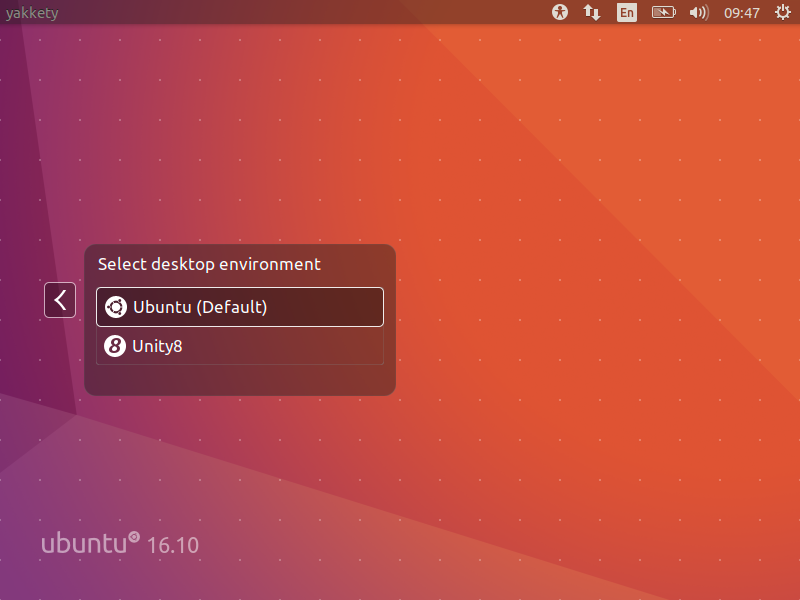
Unity 8
Note: Unity 8 won’t be the default desktop on Ubuntu 17.04 or 17.10 or 18.04. Ubuntu Unity is dead and GNOME will be the default desktop environment starting Ubuntu 18.04.
Swap File Instead of Swap Partition
Canonical’s Dimitri John Ledkov announced that Ubuntu 17.04 will use Swap files by default on non-LVM installs.
He explains that, quite simply, the need for a separate swap partition that’s (at least) twice the RAM size “makes little sense” on systems where memory isn’t limited.
For a common, general, machine most of the time this swap will not be used at all. Or if said swap space is in use but is of inappropriate size, changing it in-place in retrospect is painful.
Ubuntu17.04 Zesty Zapus will use swap files by default. Sizing of swap files is different to the swap partitions and typically use no more than 5% of free disk space (or 2048MB of RAM), which is another potential benefit.
The change does not apply to those who install Ubuntu using the LVM (Logical Volume Manager) option.
What’s important here is that some form of swap is maintained, it doesn’t matter how the swap is implemented. Anyone who’s ever used or set-up a ‘no swap’ system only to then run out of memory will know it’s not a pretty experience!
More Snaps
Canonical’s Will Cooke said that “by 18.04 everything will be Snaps and Unity 8 all the way down” and Engineering director Kevin Gunn, added that, “Canonical has an aggressive internal goal to try to get a usable all-snaps based image for Unity 8 out by 17.04”. So, although Snaps wouldn’t be replacing apt anytime soon.
32-bit PowerPC Support is Dropped
You might not have realized but Ubuntu till now used to support the aging 32-bit PowerPC architecture. As Debian has decided to drop this support, naturally Ubuntu followed the suit and has decided to drop the support for 32-bit PowerPC too, starting from Ubuntu 17.04.
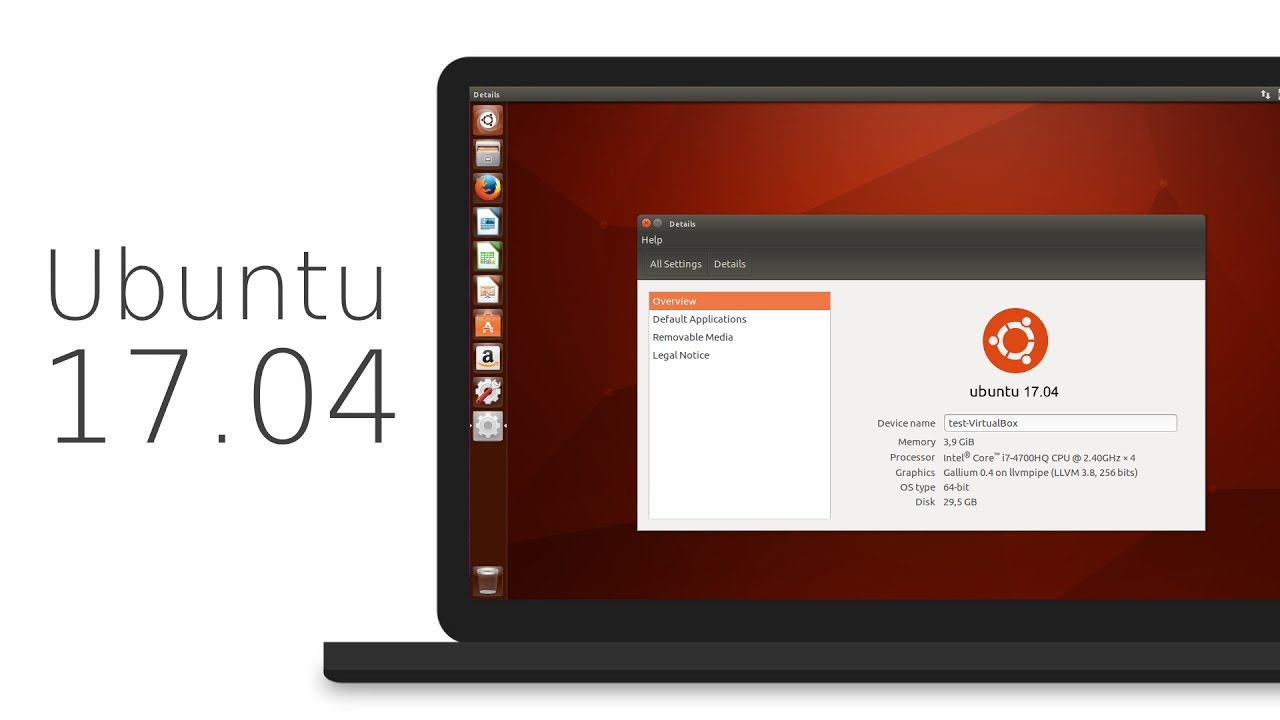
ubuntu 17.04
As you may have already noticed that most of these updates discussed above are found in Desktop version. So, in general, a common question automatically comes up, ‘isn’t there any changes for the new Ubuntu 17.04 server version?’ Well, of course Ubuntu released many updates for the Ubuntu 17.04 server version as well. Ubuntu Server 17.04 also comes with these following updates,
Qemu 2.8
Qemu has been updated to the 2.8 release.
Libvirt 2.5
Libvirt has been updated to version 2.5. For administrators worth to consider is that depending on the system setup and huge page size availability the specification of a page size for huge pages in a guest xml can now be mandatory.
LXD 2.12
LXD, now at version 2.12, introduces support for GPU passthrough, including NVidia CUDA. A new storage API has also been added, allowing for the creation of multiple storage pools which can then be used to host containers or independent storage volumes. And a number of new images have been added, including support for Ubuntu Core 16.
DPDK
Ubuntu 17.04 includes the latest release of DPDK, 16.11.1.
As a tech preview DPDK is now also available for ppc64el. This includes the latest improvements made in version 16.11.1 in general, but also further improvements to enable the i40e PMD and vfio-pci scanning on spapr platforms.
OpenStack Ocata
Ubuntu 17.04 includes the latest OpenStack release. OpenStack Ocata is also provided via the Ubuntu Cloud Archive for OpenStack Ocata for Ubuntu 16.04 LTS users.
Cloud-Init
Cloud-init has been updated to be stricter when identifying the cloud platform that it is running on and searching for data sources.
Why You Might Want to Upgrade
One nice thing for home users is the availability of driverless printing. Driverless printing will allow users to install just about any modern IPP Everywhere or Apple AirPrint-compatible printer via USB or network without installing a printer-specific driver. This is a big plus to folks who don’t like going through the rigmarole of finding and setting up print drivers for CUPS.
Other updates to the 17.04 release include an upgrade to LibreOffice 5.3, and a week view in the calendar. Standard-issue desktop apps will also migrate to Gnome 3.24, with the exceptions to Terminal, Evolution (email client), the Nautilus file manager, and Software (app store).
If you want to roll with an updated kernel in 16.04 like the 4.10 kernel that was recently released, you can use the Linux-mainline PPA to get newer kernel packages. If you choose to go this route, do so with care and be sure to keep the kernel updated because Ubuntu doesn’t officially support kernels from the mainline PPA. Things can and will break by using an unsupported kernel.
Asif Raihan April 23rd, 2017
Posted In: Debian, Linux, New products, News, Open Source, Operating Systems, ubuntu
Tags: linux, New products, News, Open Source, OS, ubuntu